
2. Create and configure subaccounts
Learn how to create and configure client subaccounts
In this section, we will review the following topics regarding subaccounts:
- What is a subaccount?
- The types of subaccounts and how balances and transactions work.
- How to think through your billing and fee configurations, which impact the way you configure your subaccounts.
- How to create and configure a subaccount.
- Additional subaccount FAQs and important considerations.
- Integration steps.
What is a subaccount?
A subaccount is an end client account, tied to one or more end client beneficial owners (e.g., institutional taxable account, joint account, Roth IRA) and represents one account on the ledger. Each wealth manager onboarded to Anchorage Digital Bank, has their own instance of the ledger, which will track crypto and USD positions and sits across their client's on-chain wallets and USD wallet balances.
The ledger has two types of subaccounts:
- End client funds : Accounting of end client positions and transactions.
- Anchorage Digital operational funds: Accounting for unassigned deposits, trades, settlement and withdrawals to ensure the ledger is balanced at all times. These are funds still owned by the end client but are automatically managed by the platform to ensure all balances tie out and reconcile at the end of each day.
- Network transaction fees for org : Funds deposited by Anchorage Digital for the purposes of covering all on-chain fees. These funds will not impact the ledger balances of the end client but will be seen when looking at wallets on-chain.
- FBO customer fees for org : Funds accrued for the purposes of paying subaccount and custody fees. This subaccount will only be impacted during the billing cycle.
- Payables and receivables for org : Funds held for the purposes of settling trades with liquidity providers.
- Unassigned funds for org: Funds that have not yet been assigned to a subaccount (e.g. in-kind Deposits with missing attribution information).
Each end client may have one or many subaccounts assigned to their customerId.
These subaccounts have asset position balances and transaction types, which correspond to the on-chain and off-chain activity. Funds within these subaccounts can be re-balanced within the end client's subaccounts, assuming they're settled.
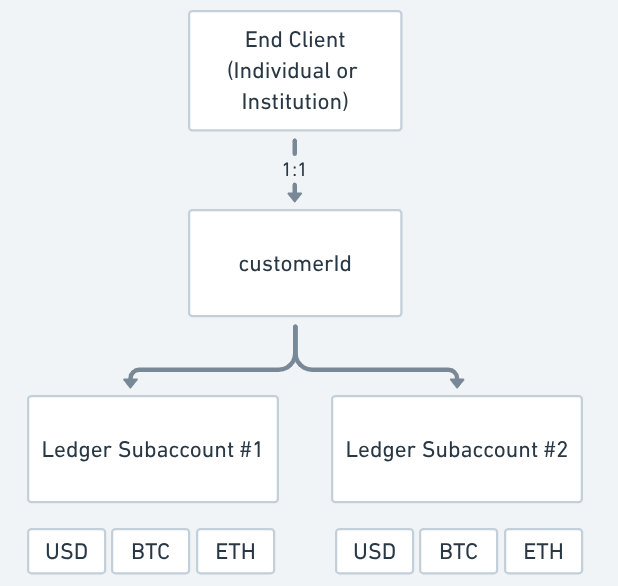
End client subaccount structure
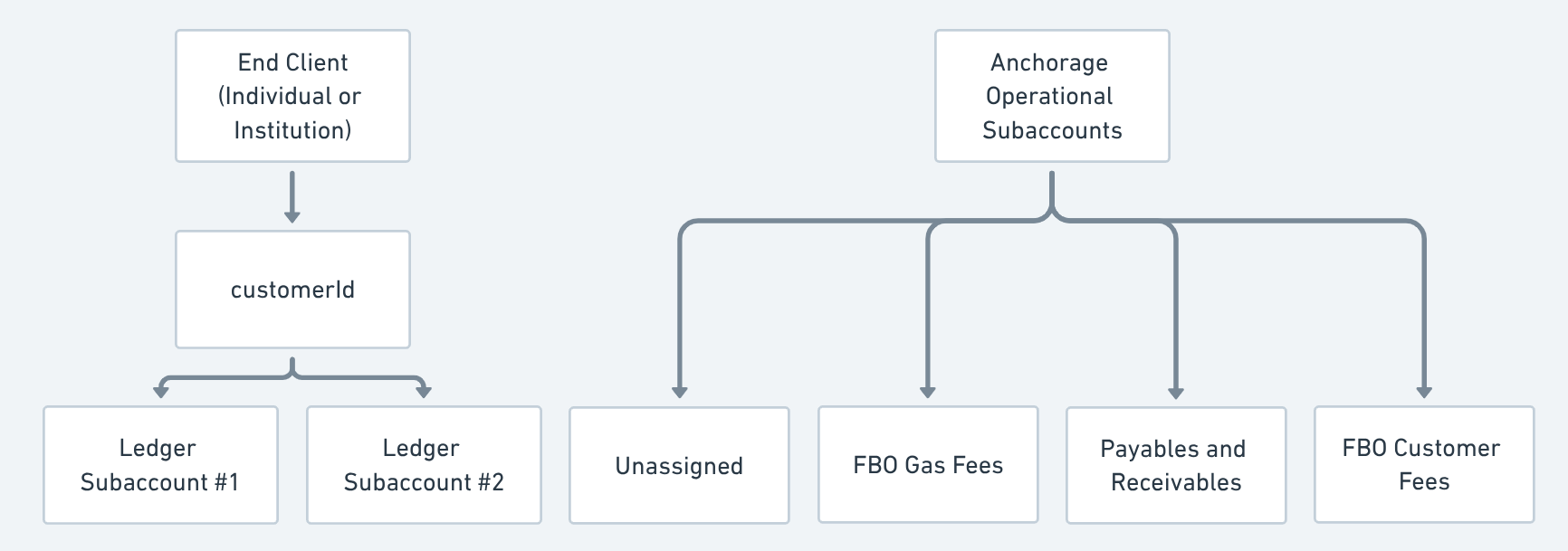
End client subaccount structure
Balances
These subaccounts have asset position balances and transaction types, which correspond to the on-chain and off-chain activity tied to the funds involved. Funds within these subaccounts can be re-balanced within an end client's subaccounts, assuming they're settled.
availableForTrading: Balance you can trade with—may include funds that have not settled.availableForWithdrawal: Balance of settled funds available to withdraw, less any unsettled trades.totalBalance: Balance after each settlement is completed.
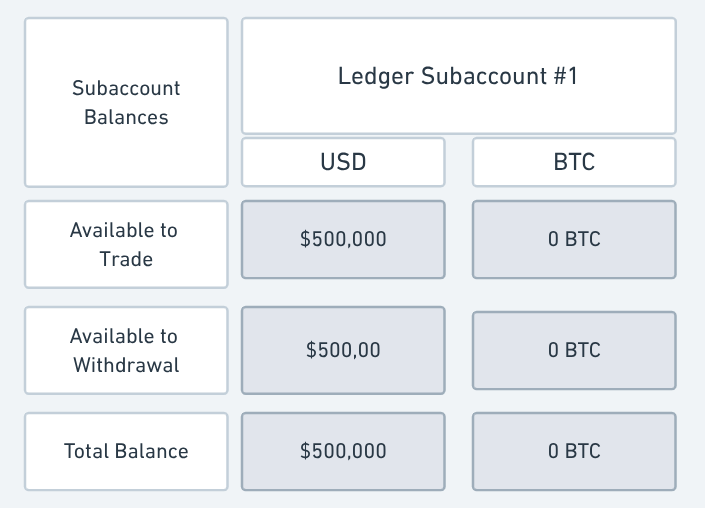
Subaccount balances
Subaccount transaction types
Each transaction type will impact the various subaccount balances and will have an associated status:
| Subaccount transaction types |
|---|
| DEPOSIT |
| WITHDRAWAL |
| TRADE |
| MANAGEMENT_FEE |
| ADVISORY_FEE |
| MODEL_FEE |
| CUSTODY_FEE |
| Subaccount transaction status | Details |
|---|---|
PENDING | This transaction is queued and funds are on hold until the transaction is POSTED or CANCELED. |
POSTED | This transaction is completed and confirmed on the blockchain. |
CANCELED | This transaction has been canceled. Funds were not successfully transferred. |
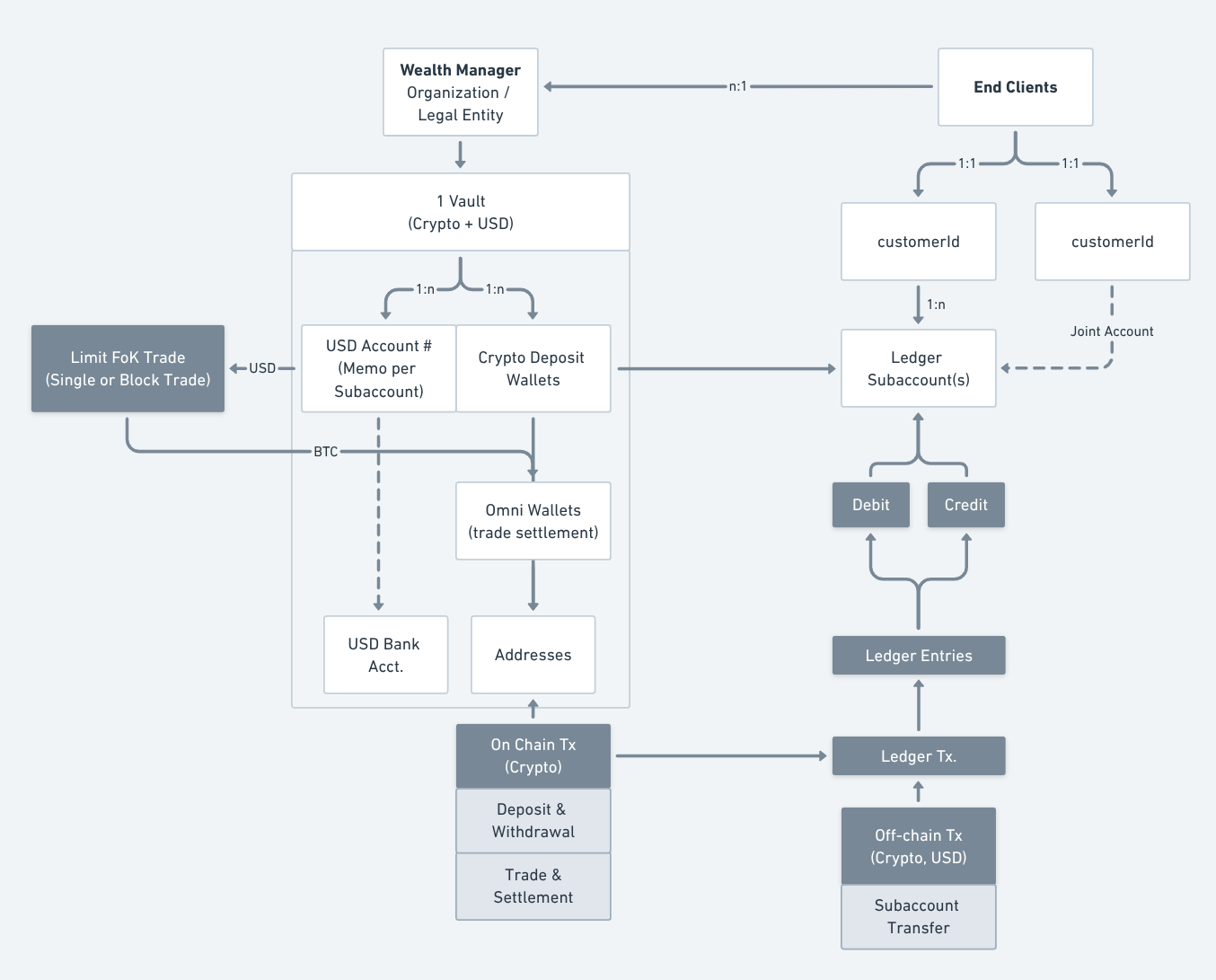
Subaccounts (Anchorage Digital operational + wealth manager operational)
- Naming conventions: Typically recommend a standard naming convention or UID for all end client subaccounts (e.g., A123_Robinson).
- Structure: You can leverage multiple subaccounts for each PC too facilitate various workflows and fee mitigation. We've seen some partners leverage.
- Deposit subaccounts
- Investment (1+)
- Hold subaccounts
- Withdrawal subaccounts
- External ID:
externalSubaccountIdis the unique client identifier created by the wealth manager for internal client management.
How does billing and fee configuration work
Billing
End clients, via their acceptance of Anchorage Digital Bank's terms & conditions, consent to debiting management and custody fees from their fiat balances in accordance with the agreed-upon fee schedule.
Anchorage Digital calculates the subaccount fees configured as isBillable = true and custody fees, then debits these from the USD balances on the 10th business day of the month. If these fees and amounts are communicated at the end of the month using 'manual billing' via API, Anchorage Digital will not be able to track these throughout the month but will still debit these fees and custody fees from the USD balance.
Net management fees are then remitted to the wealth manager. Transparency into the fee amounts and calculations are available to the wealth manager via API. Each wealth manager is responsible for managing end client USD balances to ensure there are sufficient amounts to debit fees each month.
Any subsequent changes to fee rates, are communicated by ADB to the end client directly via email notifications at the email address collected during onboarding due diligence.
Rates used for the purposes of calculating custody fees are those agreed to in the umbrella services agreement, signed by the wealth manager and Anchorage Digital Bank. Fee rates are based upon the assets under custody (AUC) aggregated at the wealth manager-level.
Custody statements are provided monthly to end clients and clearly identify management and custody fees debited from their subaccounts, as well as the rate used to calculate the management fee determined by the wealth manager.
Billing and fee management configuration
When getting started with your integration, it is important to think through the various billing configurations and how you would plan to manage fees and billing cycles.
There are a few important concepts we will dive into:
- Billing methods
- Fee model
- Fee visibility & tracking
- Fee types
- Fee accruals
- Fee calculation methodology
- Billing life-cycle
- Logistics and timing
Billing methods
There are various billing methods we enable you to choose from, depending on how the wealth manger would like to manage fees and billing:
| Billing method | Overview |
|---|---|
| Automated billing | Billing fees configured at the time of subaccount setup. If this is leveraged, these will be billed. |
| Manual billing | Needs to be submitted by the wealth manger via manual billing API end-point and can be processed before Anchorage Digital finance pays out. |
Fee model
| Fee model | Overview |
|---|---|
| Bundled | Bundled fee model refers to the wealth manger charging a single “management fee” showing up as a single-line item on the PC monthly statement. Anchorage Digital's custody fee is deducted from this overall fee charged to the wealth manager. |
| Fully disclosed | Unbundled (aka “fully disclosed”) fee means every fee type that the wealth manger chooses to charge their clients (i.e. PCs) are disclosed on the PC statement. E.g., PC will see a custody fee and management fee all show up as separate line-items on their monthly statements. |
Fee types
| Fee type | Details |
|---|---|
CUSTODY_FEE | Configured by Anchorage Digital during wealth manager onboarding. This rate may change based on total crypto assets held (AUC), depending on the agreed upon commercial terms. Not configurable via API. This is calculated by taking the end of day USD value of the asset and averaging this over the fee period. |
MANAGEMENT_FEE | Fee charged by the wealth manager (via Anchorage Digital) for managing the clients money (often in the 1-2% of AUM range with minimums applied) |
ADVISORY_FEE | Configured during subaccount setup via API, primarily used if there are third-party wealth manger's involved, otherwise left as “0”. |
MODEL_FEE | Configured during subaccount setup via API, primarily used to bill for any model fee. |
Fee visibility and tracking
If you choose to leverage the automated fee model, and apply at least one of the three fees configured over API for the subaccounts, you will need to decide if you want to make these fees billable or not.
This enables you to more easily track and manage fees internally without exposing all fee granularity to your end clients. Depending on how you want to expose these fees will determine which fee bucket you fall into (Bundled or Unbundled/Fully disclosed)
| Fee visibility | Details |
|---|---|
isBillable = true | If isBillable = true the fee balance will be accrued daily AND bill to end client subaccounts on a monthly basis and will show as a separate line item on each statement. |
Custody Fee will default to isBillable=true assuming the Wealth Manager is planning to leverage the "Unbundled / Fully disclosed" billing model. If not, please see Bundled below for more details. | |
Fees markedisBillable =true show up on the end client statement on the 1st of the month. | |
isBillable = false | If the fees are marked withisBillable = falsethe fee will be accrued daily but NOT billed to the PC subaccount on a monthly basis. Most use this as a means to track fees / external fee distributions from their single Management Fee once they receive their remittance. |
| These will not appear on the statements but will be available to pull accrued balances via API. |
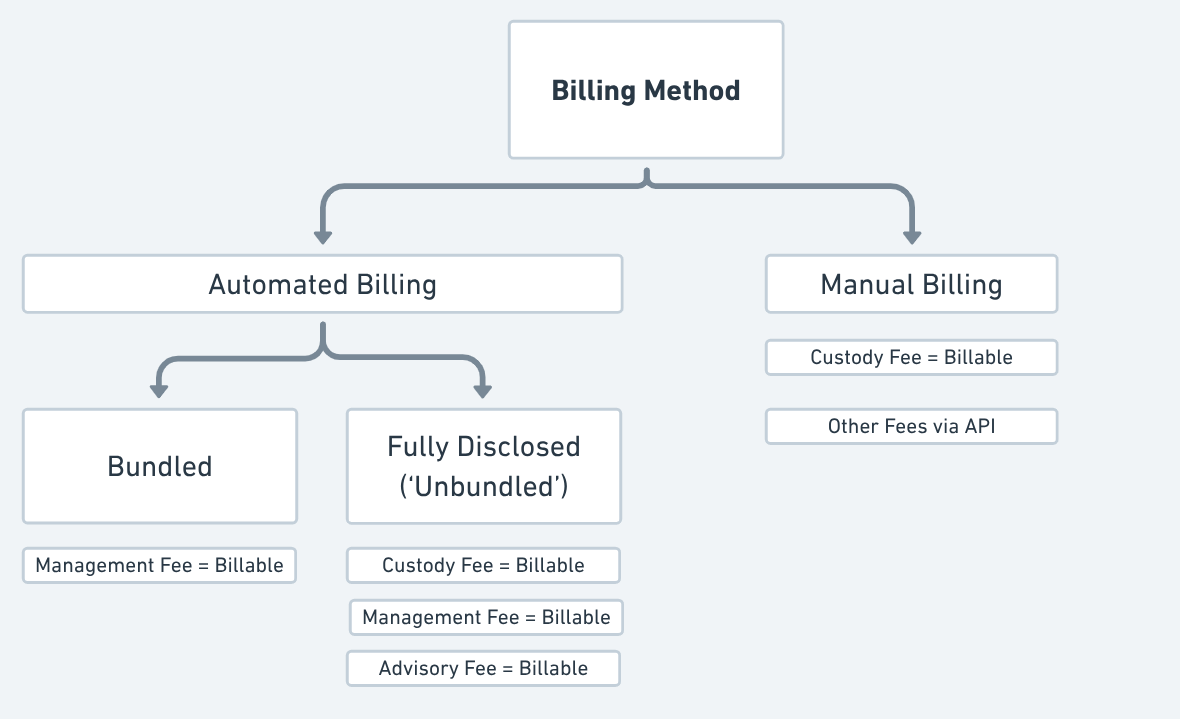
Fee accruals
Within each subaccount, there will be an accruedFees section. This is meant to convey the estimated fees accrued on the account based on the average AUC, not the actual point-in-time fees on the account to-date.
Note: The termaccruedValue can be confusing and does not necessarily represent the actual fees to be charged based on the prior day's fee accruals. This value represents the average fee that has accrued based on the number of days and average AUC in the account. We do not recommended using this to display any sort of mid-month "performance net of fees" estimation, as this will not reflect the actual balance of fees for the number of days past but rather the average.
There are a few critical fields to note here:
| Field | Details |
|---|---|
startPeriod | Billing month start date. |
endPeriod | Billing month end date. |
accruedValue | Accrued fee value to-date for that billing period. |
rate | The rate should be in percentage format. The rate should be a value between 0 and 1 where 0.01 is 1%. |
type | The fee type corresponding with the accruedFee object. |
totalBalanceInUSD | Most recent AUC balance in USD terms used to calculate the accruedFees. |
state | If ONGOING, it is still being accrued. If DONE, the billing period is closed (end of month). |
Example subaccount with fee accruals
{
			"createdAt": "2025-02-1T19:11:06.390Z",
      "customerId": "9bcbbb3136356ff85670085f64cfb4f53419a94277261be0094c4d97de71a4yb",
      "externalSubaccountId": "1A-13579-Doe",
      "fees": [
        {
          "isBillable": true,
          "rate": 0,
          "startDate": "2024-08-02",
          "type": "ADVISORY"
        },
        {
          "isBillable": false,
          "rate": 0.0025,
          "startDate": "2024-11-20",
          "type": "CUSTODY"
        },
        {
          "isBillable": true,
          "rate": 0,
          "startDate": "2024-08-02",
          "type": "MANAGEMENT"
        },
        {
          "isBillable": true,
          "rate": 0,
          "startDate": "2024-08-02",
          "type": "MODEL"
        }
      ],
      "name": "1A-13579-Doe",
      "subaccountId": "99fc9d84-4843-4a2c-95cc-1d90385c7955"
    },
    {
      "accruedFees": [
        {
          "accruedValue": "2982.05",
          "endPeriod": "2025-01-31",
          "rate": 0.351,
          "startPeriod": "2025-01-01",
          "state": "DONE",
          "totalBalanceInUSD": "100032.1",
          "type": "CUSTODY"
        },
        {
          "accruedValue": "1731.5",
          "endPeriod": "2025-02-18",
          "rate": 0.351,
          "startPeriod": "2025-02-01",
          "state": "ONGOING",
          "totalBalanceInUSD": "100031.22",
          "type": "ADVISORY"
        }
      ],
      "balances": [
        {
          "assetType": "BTC",
          "availableForTrading": "0.00018915",
          "availableForWithdrawal": "0.00018915",
          "totalBalance": "0.00032102"
        },
        {
          "assetType": "ETH",
          "availableForTrading": "0.19400093",
          "availableForWithdrawal": "0",
          "totalBalance": "0"
        },
        {
          "assetType": "USD",
          "availableForTrading": "87676.46",
          "availableForWithdrawal": "87676.46",
          "totalBalance": "100000"
        }
Fee calculation and methodology
Starting on the 2nd day of month 1, each subaccount will begin accruing fees based on the rolling average AUC in the account divided by the number of days held in the subaccount over that month. The "accrual" is not a net addition each day to the total fees listed as accrued, but rather a daily calculation using the rolling average logic.
This should not used to calculate performance-net-of-fees, but rather a rough estimate at how much you'll pay at the end of the month based on the current AUC.
Fee calculation
accruedValue= (AvgAUC x feeRate) x ( numberOfDays / 365)Note: Avg AUC is calculated based on the totalBalance
Billing life-cycle
The following lifecycle applies to subaccount fees which are labeled as isBillable = true. For those listed as false, these will just revert to:
- (January - day 1): Billing period starts and
acrruedFeebegins calculating at the end of the day. Thestate=ONGOING. - (January - day 2 - 30): Billing period reflects
acrruedFeestarting on the 2nd. - (January - day 31st (or end of month): Billing period closes and the
state=DONE. - (February- day 1): Fee transaction will show on the ledger at 8:00 am ET (1:00:00 pm UTC) as
PENDINGand theacrruedFeefee object will reflectDONE. - (Month 2 - day 2 - 9th business day): Billing dispute period. For any questions, please reach out to your account point of contact to raise any questions.
- (Month 2 - day 10th business day): Billing transactions are finalized and the subaccount transaction will update to
POSTED. Fees are then withdrawn from the subaccounts and remittance process back to wealth managers begins. Fee transactions will update on the ledger at 8:00 am ET (1:00:00 pm UTC).
Note: For subaccounts with mid-month billing period, the fees will be pro-rated to only consider the days with an active subaccount.
Additional billing considerations
- Manual billing method: This needs to be submitted by partner via manual billing API end-point prior to the 10th business day to ensure Anchorage can process this in time to pay out on the 10th business day.
- Cash management for billing: Keep 3 months of USD in the subaccout for billing, rather than requiring liquidation events, which trigger taxable events for the end client.
- 0-rate subaccount fees: If the rate is “0”, nothing is accrued or posted as a transaction.
- Negative USD balances: If the current USD balance is insufficient mid-month, the ledger reflects a negative USD balance. This needs to be offset before the 10th business day to ensure sufficient funds are available to withdrawal the correct amount the subaccount.
- Rate changes: Anchorage Digital will send an email notification to the end client to notify them when rates are created or changed, only for fees that are Billed (
isBillable=true). - Fees to be set in percentage terms: When configuring the fee, configure the fee to be set in percentage terms.
- 1% fee = 0.01 rate value
Integration steps: Subaccount creation
Subaccount applications can be created tied to one or two end clients. The following account types are supported, with the number of linked end client and client types shown:
| Account type | Account subtype | Number of end client(s) | Type of end client(s) |
|---|---|---|---|
| IRA | 1 | Individual | |
| IRA | ROLLOVER | 1 | Individual |
| IRA | CONVERSION | 1 | Individual |
| ROTH | 1 | Individual | |
| ROTH | ROLLOVER | 1 | Individual |
| ROTH | CONVERSION | 1 | Individual |
| JOINT | 2 | Individual | |
| CUSTODIAL | 2 | Individual | |
| INDIVIDUAL_TAXABLE | 1 | Individual | |
| INSTITUTIONAL_TAXABLE | 1 | Institution |
Note: For each end client subaccount, we require a signer who can serve as an authorized individual to represent the client. The signer can be the actual client or someone else.
| Account type | Expected program signers |
|---|---|
| IRA | linked end client who owns the subaccount |
| ROTH | linked end client who owns the subaccount |
| JOINT | both linked end clients who own the subaccount |
| CUSTODIAL | parent end client linked to the subaccount, not the child |
| INDIVIDUAL_TAXABLE | linked end client who owns the subaccount |
| INSTITUTIONAL_TAXABLE | an initial set of program signers named for the subaccount |
Step 1: Create an end client subaccount application
POST /v2/onboarding/subaccounts
POST /v2/onboarding/subaccountsapplicationType: RIA_PC_ACCOUNTexternalId: unique identifier used by the wealth platform to identify this subaccountsubmit- optional boolean flag to indicate if it should submit the request right away or if there will be more changes on the application and will be submitted later.entries- refer the table below to check all the possibilities for the entries object. Also check all examples below for all the accounts possibilities and requirements.
The endpoint accepts the following entries data:
| Tag | Description | Required | Type | Value restrictions |
|---|---|---|---|---|
| legalEntityName | legal entity name | Yes | String | |
| accountType | account type | Yes | Enum | IRA, ROTH , JOINT, |
| CUSTODIAL, INDIVIDUAL_TAXABLE or INSTITUTIONAL_TAXABLE | ||||
| accountSubtype | account subtype | no, accepted only for accountType = IRA or ROTH | Enum | ROLLOVER or CONVERSION |
| programSignerGroup | list of program signers | Yes | Array | |
| programSignerGroup/programSignerFirstName | first name | Yes | Date | |
| programSignerGroup/programSignerLastName | last name | Yes | String | |
| programSignerGroup/programSignerEmail | email address | Yes | String | valid e-mail address |
| documentPreferenceAddressDefaultEmail | email address list | Yes | String | valid e-mail addresses, separated by commas |
| termsAgreementID | terms agreement ID | yes, if terms & conditions are enabled | String | ID returned from /v2/onboarding/agreements/terms endpoint |
| beneficiaryGroup | list of beneficiaries | No | Array | |
| beneficiaryGroup/beneficiaryType | beneficiary type | Yes | Enum | SPOUSE, FAMILY_OR_FRIEND, CHARITY, TRUST or ESTATE |
| beneficiaryGroup/beneficiaryName | beneficiary name | Yes | String | |
| beneficiaryGroup/beneficiaryAllocation | beneficiary allocation | Yes, sum of all allocations should equal 100 | Number | number between 1 and 100 |
| contingencyBeneficiaryGroup | list of contingency beneficiaries | No | Array | |
| contingencyBeneficiaryGroup/beneficiaryType | beneficiary type | Yes | Enum | SPOUSE, FAMILY_OR_FRIEND, CHARITY, TRUST or ESTATE |
| contingencyBeneficiaryGroup/beneficiaryName | beneficiary name | Yes | String | |
| contingencyBeneficiaryGroup/beneficiaryAllocation | beneficiary allocation | Yes, sum of all allocations should equal 100 | Number | number between 1 and 100 |
| fees | list of fees | No | Array | |
| fees/feeType | fee type | Yes | Enum | ADVISORY, MODEL or MANAGEMENT |
| fees/feeRate | fee rate | No | Number | decimal number between 0 and 1 |
| fees/feeIsBillable | is fee billable? | No | Boolean | YES or NO |
| programCustomers | list of linked end clients | Yes | Array | |
| programCustomers/programCustomerId | end client customer ID | Yes | String | customerId |
| programCustomers/programCustomerRole | end client customer role | Yes | Enum | PRIMARY or SECONDARY |
| submit | automatically submit if no errors found | No, defaults to false | Boolean | Tue or false |
A unique subaccountId is returned, which will be used in all future calls to identify this wealth platform customer at Anchorage Digital.
Sample
Request:
{
    "name": "{{name}}",
    "externalId": "{{externalId}}",
    "submit": true,
    "entries": [
        { "key": "legalEntityName", "value": "SubAccount IRA ROLLOVER" },
        { "key": "accountType", "value": "IRA" },
        { "key": "accountSubtype", "value": "ROLLOVER" },
        { "key": "documentPreferenceAddressDefaultEmail", "value": "[email protected]" },
        { "key": "programSignerGroup", "value": [
                {
                    "programSignerFirstName": "Kevin",
                    "programSignerLastName": "Flynn_5",
                    "programSignerEmail": "[email protected]"
                },
                {
                    "programSignerFirstName": "Kevin",
                    "programSignerLastName": "Flynn_6",
                    "programSignerEmail": "[email protected]"
                }
            ]
        },
        { "key": "programCustomers", "value": [
                {
                    "programCustomerId": "{{customerId1}}",
                    "programCustomerRole": "PRIMARY"
                }
            ]
        },
        { "key": "beneficiaryGroup", "value": [
                {
                    "beneficiaryType": "SPOUSE",
                    "beneficiaryName": "Test beneficiary",
                    "beneficiaryAllocation": "50"
                },
                {
                    "beneficiaryType": "CHARITY",
                    "beneficiaryName": "Test beneficiary 2",
                    "beneficiaryAllocation": "50"
                }
            ]
        },
        { "key": "contingencyBeneficiaryGroup", "value": [
                {
                    "beneficiaryType": "FAMILY_OR_FRIEND",
                    "beneficiaryName": "Test beneficiary 3",
                    "beneficiaryAllocation": "25"
                },
                {
                    "beneficiaryType": "TRUST",
                    "beneficiaryName": "Test beneficiary 4",
                    "beneficiaryAllocation": "75"
                }
            ]
        },
        { "key": "fees", "value": [
                {
                    "feeType": "ADVISORY",
                    "feeRate": "0.1"
                },
                {
                    "feeType": "MANAGEMENT",
                    "feeRate": "0.25",
                    "feeIsBillable": true
                }
            ]
        }
    ]
}
Step 2: Check the status of the end client subaccount application
GET /v2/onboarding/subaccounts/{{subaccountId}}
GET /v2/onboarding/subaccounts/{{subaccountId}}Any errors or missing documents will be listed in the errors section of the returned JSON.
Sample
Response:
{
  "data": {
    "entries": [
      {
        "key": "programSignerGroup",
        "value": [
          {
              "programSignerFirstName": "Kevin",
              "programSignerLastName": "Flynn_5",
              "programSignerEmail": "[email protected]"
          },
          {
              "programSignerFirstName": "Kevin",
              "programSignerLastName": "Flynn_6",
              "programSignerEmail": "[email protected]"
          }
        ]
      },
      {
        "key": "documentPreferenceAddressDefaultEmail",
        "value": "[email protected]"
      },
      {
        "key": "accountType",
        "value": "IRA"
      },
      {
        "key": "accountSubtype",
        "value": "ROLLOVER"
      },
      {
        "key": "programCustomers",
        "value": [
          {
            "programCustomerId": "43a37de2dcc326579fe9ab3a187c48b786007bd759802dfa04ef1aa35383a273",
            "programCustomerRole": "PRIMARY"
          }
        ]
      }
    ],
    "errors": [],
    "externalId": "37c4abc1-b94b-48d7-a41b-c4e4becc865a",
    "name": "SubAccount IRA ROLLOVER 20250407-2",
    "status": "IN_PROGRESS",
    "subaccountId": "4305271f-7c1c-4b72-bb80-82b2e144d19d"
  }
}
Step 3: Submit the application (if submit = false)
submit = false)POST /v2/onboarding/subaccounts/{{subaccountId}}/submit
POST /v2/onboarding/subaccounts/{{subaccountId}}/submitStep 4: Check the subaccount approval status
GET /v2/subaccounts/customers/accounts?subaccountIds={{subaccountId}}
GET /v2/subaccounts/customers/accounts?subaccountIds={{subaccountId}}This will return details of the subaccount, and its approval and creation status. When received but pending approval, the status will be PENDING. When approved and created, the status will be OPEN.
Alternatively you can register for a webhook asynchronous response for an event when the subaccount is opened. Information on registering for webhooks is available here.
Sample
{
   "data": {
       "applicationId": "6ba46417-66dc-424e-8e68-4fbd2597d993",
       "entries": [
           {
               "key": "programSignerGroup",
               "value": [
				          {
				              "programSignerFirstName": "Kevin",
				              "programSignerLastName": "Flynn_5",
				              "programSignerEmail": "[email protected]"
				          },
				          {
				              "programSignerFirstName": "Kevin",
				              "programSignerLastName": "Flynn_6",
				              "programSignerEmail": "[email protected]"
				          }
               ]
           },
           {
               "key": "programCustomers",
               "value": [
                   {
                       "programCustomerId": "43a37de2dcc326579fe9ab3a187c48b786007bd759802dfa04ef1aa35383a273",
                       "programCustomerRole": "PRIMARY"
                   }
               ]
           },
           {
               "key": "accountSubtype",
               "value": "ROLLOVER"
           },
           {
               "key": "accountType",
               "value": "IRA"
           },
           {
               "key": "beneficiaryGroup",
               "value": [
                   {
                       "beneficiaryAllocation": "50",
                       "beneficiaryName": "Test beneficiary",
                       "beneficiaryRelation": "Primary",
                       "beneficiaryType": "Spouse"
                   },
                   {
                       "beneficiaryAllocation": "50",
                       "beneficiaryName": "Test beneficiary 2",
                       "beneficiaryRelation": "Contigency",
                       "beneficiaryType": "Charity"
                   }
               ]
           },
           {
               "key": "fees",
               "value": [
                   {
                       "feeRate": "0.1",
                       "feeType": "Advisory"
                   },
                   {
                       "feeIsBillable": "Yes",
                       "feeRate": "0.25",
                       "feeType": "Management"
                   }
               ]
           },
           {
               "key": "documentPreferenceAddressDefaultEmail",
               "value": "[email protected]"
           },
           {
               "key": "legalEntityName",
               "value": "SubAccount IRA ROLLOVER"
           }
       ],
       "errors": [],
       "status": "COMPLETE"
   }
}
Changelog
| Date | Change |
|---|---|
| June 10, 2025 | Updates for new onboarding API payloads and flows |
| May 1, 2025 | Initial version |
Updated 6 months ago