
Anchorage Digital agency trading APIs
Getting started with Anchorage Digital agency trading APIs
Enabling API functionality for your trading at Anchorage Digital can simplify your recordkeeping and improve your trading efficiency. This section outlines the process of creating or updating an API key to allow for the functionality you need for your organization.
Confirm trading is active
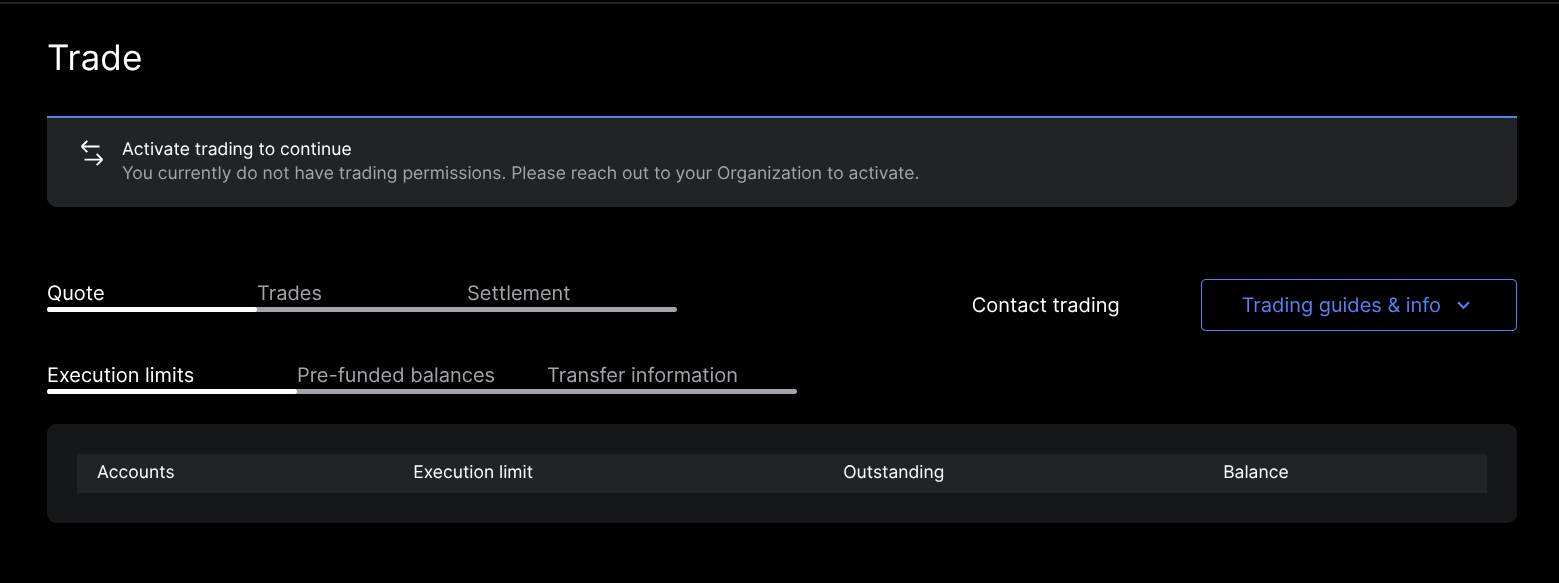
The Anchorage Digital Team is required to activate trading for a new user. If you are unsure whether trading has been activated, select "Trade" within the Anchorage Digital web dashboard. If you see the below screenshot, then reach out to your account representative to activate trading before continuing.
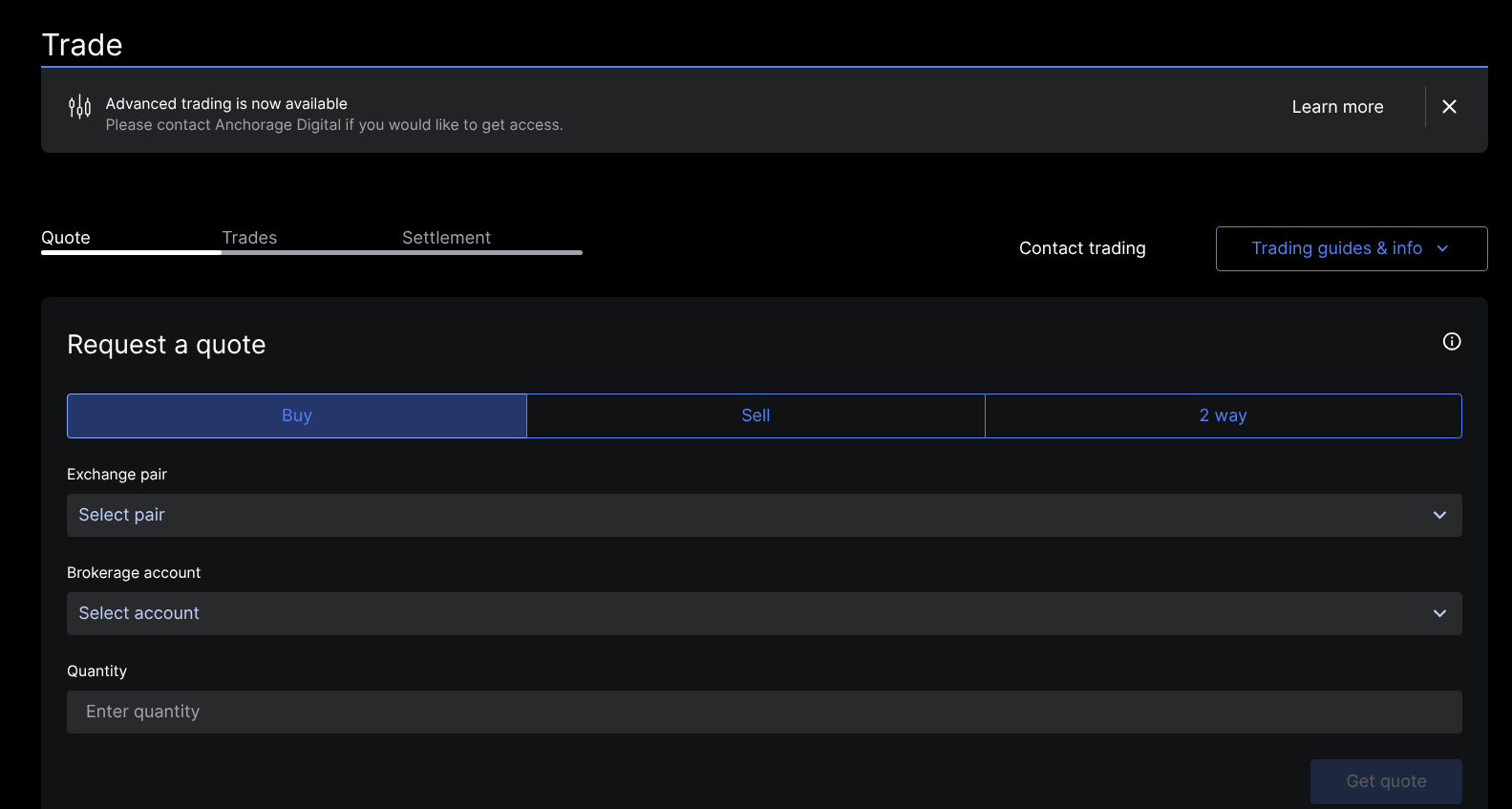
Once trading has been activated, the Trade page will show you the RFQ trade options below.
API key permissions
If you have not already created an API key, or if you plan to create a new API key for trading purposes, refer to our How to generate an API Key section.
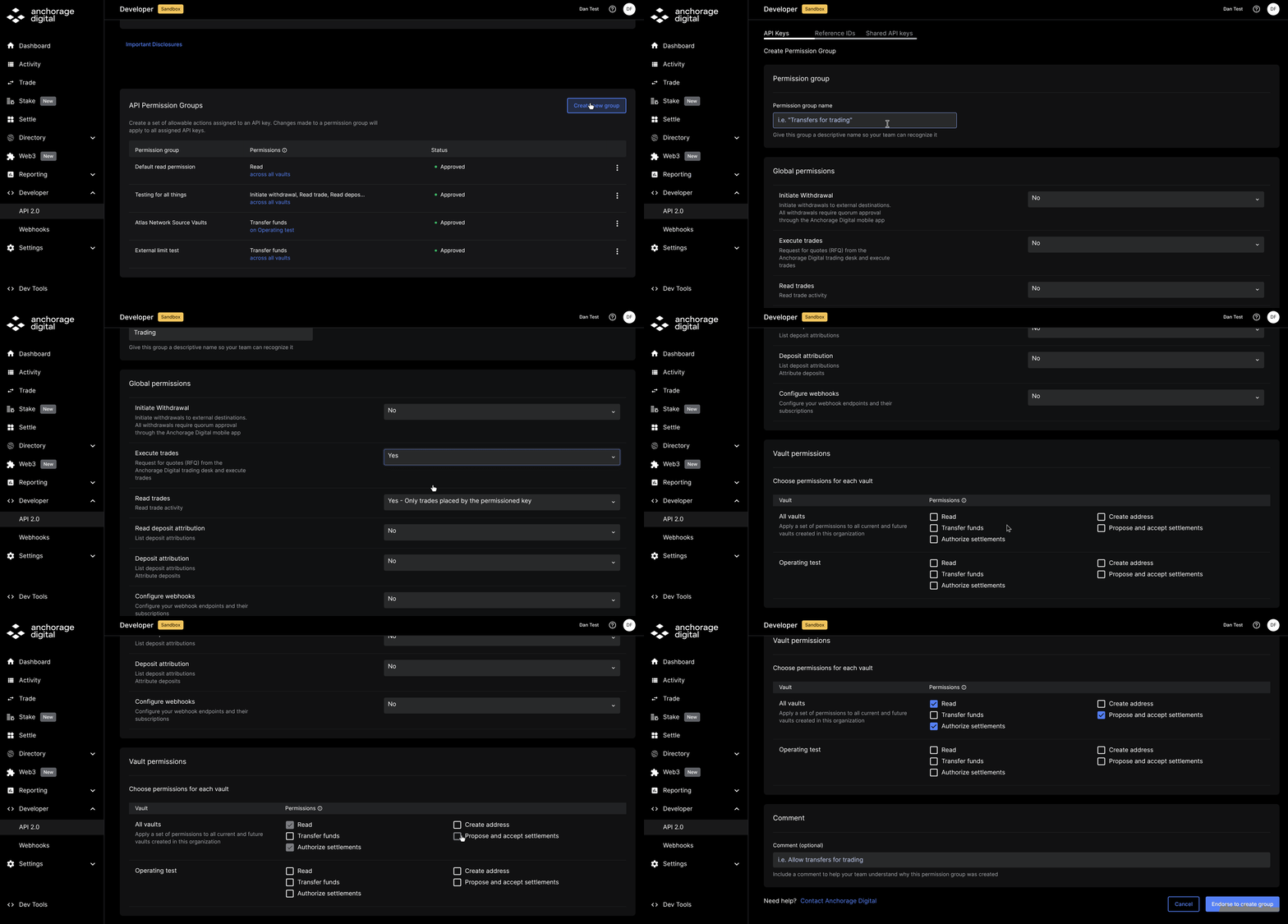
When creating a new API key, consider both the Global Permissions including the Execute Trades and Read Trades permission sets, but also the Vault Permissions which will allow the API key to Propose and or Authorize Settlements.
Read trade permissions can either allow an API key to (a) read only those trades made by that specific key, or (b) read all trading activity across the organization. Permissions default to (a) as it is more restrictive.
Read trades permissionIf you have previously enabled ‘Read trades’ access for an API key and later activated trading, you will need to update the permission of the key to include the ability to read trades across the organization if desired. Anchorage Digital defaults to only allowing the API key read access to trades made by the specific API Key.
Note: The Vault-level settlement permissions are relevant forAtlas customers. Atlas can be used to conduct settlements. This can include one-way settlement with Anchorage Digital to pre-fund trading.
Trading account configuration
Trading accounts are either configured for pre-funded trading or credit limit trading. Pre-funded trading requires the account to send USD or digital assets to Anchorage Digital's Trading desk in order to conduct trading. Credit limit configuration allows an account to trade up to a defined exposure limit without depositing assets. Refer to Trading Documentation (Front End) for a guide of Anchorage Digital's trading interface.
Pre-funded trading and testing
Accounts configured for pre-funded trading will need to deposit assets to the relevant Anchorage Digital trading desk prior to conducting trading in production. Pre-funded balances will not consider any assets in an entity's custody account, only those sent to the trading desk.
Conducting a Buy or Sell trade requires your account to be pre-funded in the relevant asset you would like to trade in. To illustrate this further, if the account has only been funded in USD, the account will not be able to sell ETH (or any digital asset) until the account executes a Buy Order for that asset or pre-funds their account with the asset.
When testing in the sandbox environment, the Anchorage Digital team can allocate test USD to mimic pre-funded cash at your request.
Once a trade has been executed, the pre-funded balance will immediately reduce the sell-side asset from the account's balance. For example, if you buy BTC with USD, the relevant USD amount will immediately be removed from the pre-funded balance, while the BTC will be visible in the "Settlement" tab until the trade has fully Settled, at which time it will be present in the pre-funded balances.
Credit limit trading
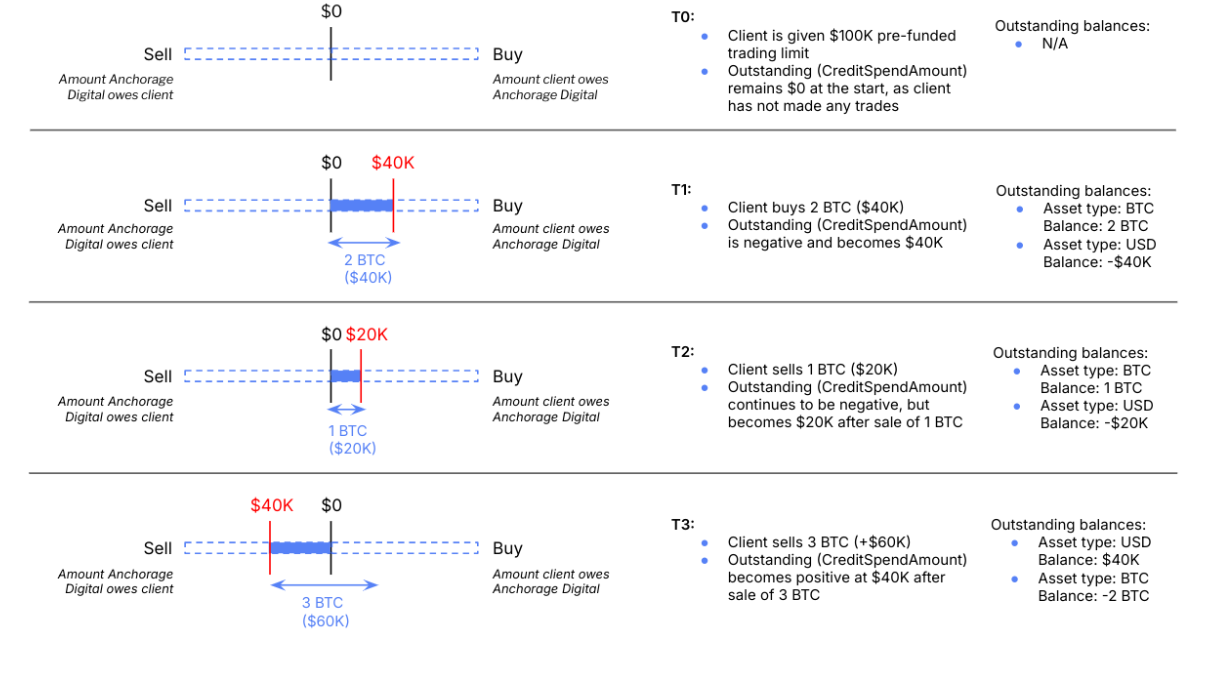
Accounts configured credit trading will have a credit limit in USD assigned to their account. The account will be able to execute trades without pre-funding balances, provided the exposure amount does not exceed the credit limit set. Credit usage is calculated based on the value of each trade. Once a trade settles, it will no longer be considered against the account's credit limit.
Consider that the first trade of the day will increase the credit spend, regardless of the side of the trade. The second trade will either increase or decrease the amount used based on the trade direction. If it’s in the same direction, the credit amount used will increase. A trade in the opposite direction will reduce this, potentially even setting back to $0 and then increasing again—this time in the other direction. See the below graphic for more information.
Supported assets
Anchorage Digital supports different assets for custody versus for. trading. Asset pairs supported for trading are driven by factors including market liquidity and regulatory requirements. Depending on the entity you are trading with you, will see different asset pairs available for trading.
Note that the supported trading pairs in staging may differ from production due to internal testing. Always refer to the production endpoint for a current list of supported pairs.
To check which asset-pairs are supported you can use the GET trading pairs end point as described in the Trading Read APIs page.
Overview of trading operations
There are several basic categories of trading operations which Anchorage Digital uses to organize trading activities. Each of these operation categories are called using separate endpoints as described in the Trading Read API page. Generally the life cycle of a trade will begin with an accepted RFQ which leads directly to a Trade. However, for RIA and other ledger-based clients the trade cycle will begin with an Order. If the Order can be filled a trade is executed. Finally, the trade is settled when the relevant assets are moved between the parties of the trade.
Note: Settlement is not automatic in staging, so please reach out when you're ready to test these.
- Orders (primarily applicable to ledger clients like RIAs). Instructions to conduct one or more trades, often given specific conditions such as a particular price.
- Note - Anchorage Digital's system does not consider requesting a quote (RFQ) or accepting a quote as an Order. Accepted quotes will be accessible through get trade end points and RFQs which are not accepted and are not stored in our system.
- Trades. Agreement to exchange assets at a given price or rate.
Note - that a trade can be 'Executed' meaning the prices have been agreed to and the trade has been processed prior to any assets actually moving. - Settlements. The process of transferring the assets related to one or more trades between the parties of the trade.
Decimal point precision
Trades made using the RFQ API require specific decimal precision. To increase liquidity, our liquidity providers require a reduced decimal precision.
Decimal precision details can be found in the GET trading pairs API endpoint. The exact precision will depend on the pair.
Shown here is an example of a BTC-USD pair:
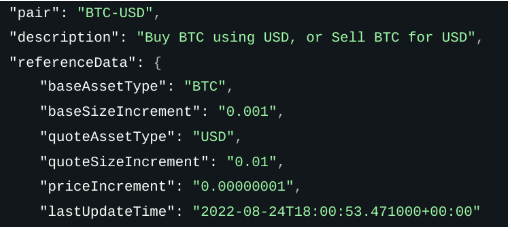
For this example:
- If the base_size_increment is three, this means that the client can request BTC with a maximum of three decimal places (i.e. 0.001).
- If the quote_size_increment is two, this means that the client can request in USD with a maximum of two decimal places (i.e. 0.01).
- If the price_increment is eight, this means that the price response the client gets back from the dealer could be up to eight decimal places (i.e. 0.00000001).
Updated about 1 year ago