
Integration guide
Overview
Anchorage Digital Bank provides federally regulated custody for some of the biggest names in institutional finance. Now, institutions issuing crypto ETFs can partner with Anchorage Digital and leverage bankruptcy-remote custody by an unequivocal qualified custodian.
With private keys offline and a low-latency architecture where most transactions process in minutes, Anchorage Digital’s support for ETF issuers and authorized participants is unrivaled.
How it works
When integrating with Anchorage Digital for ETF use cases, there are a number of capabilities and configurations to consider:
- Vaults and wallets
- Virtual ledger
- Staking
Wallets
The standard custody organization will leverage the traditional wallet structure for basic deposit, staking, and withdrawal operations. These wallets are all segregated on chain and multiple wallets for the same asset can be used, as needed.
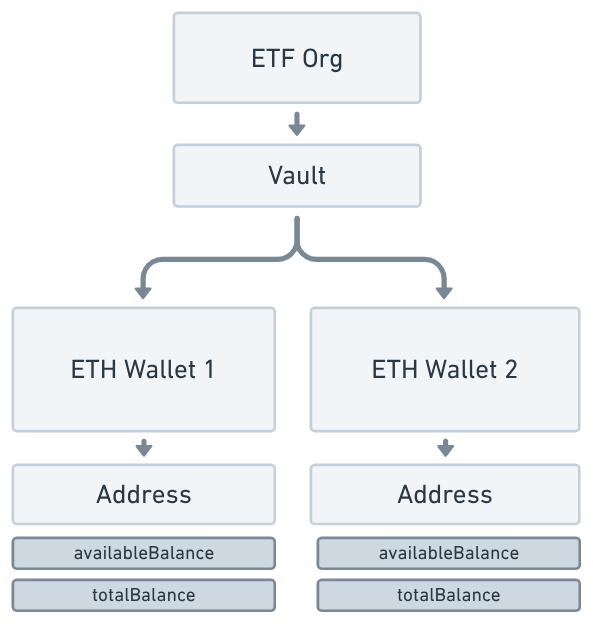
When funds have been staked, addition balances will be visible.
unclaimedBalancestakedBalance
Virtual ledger and subaccounts
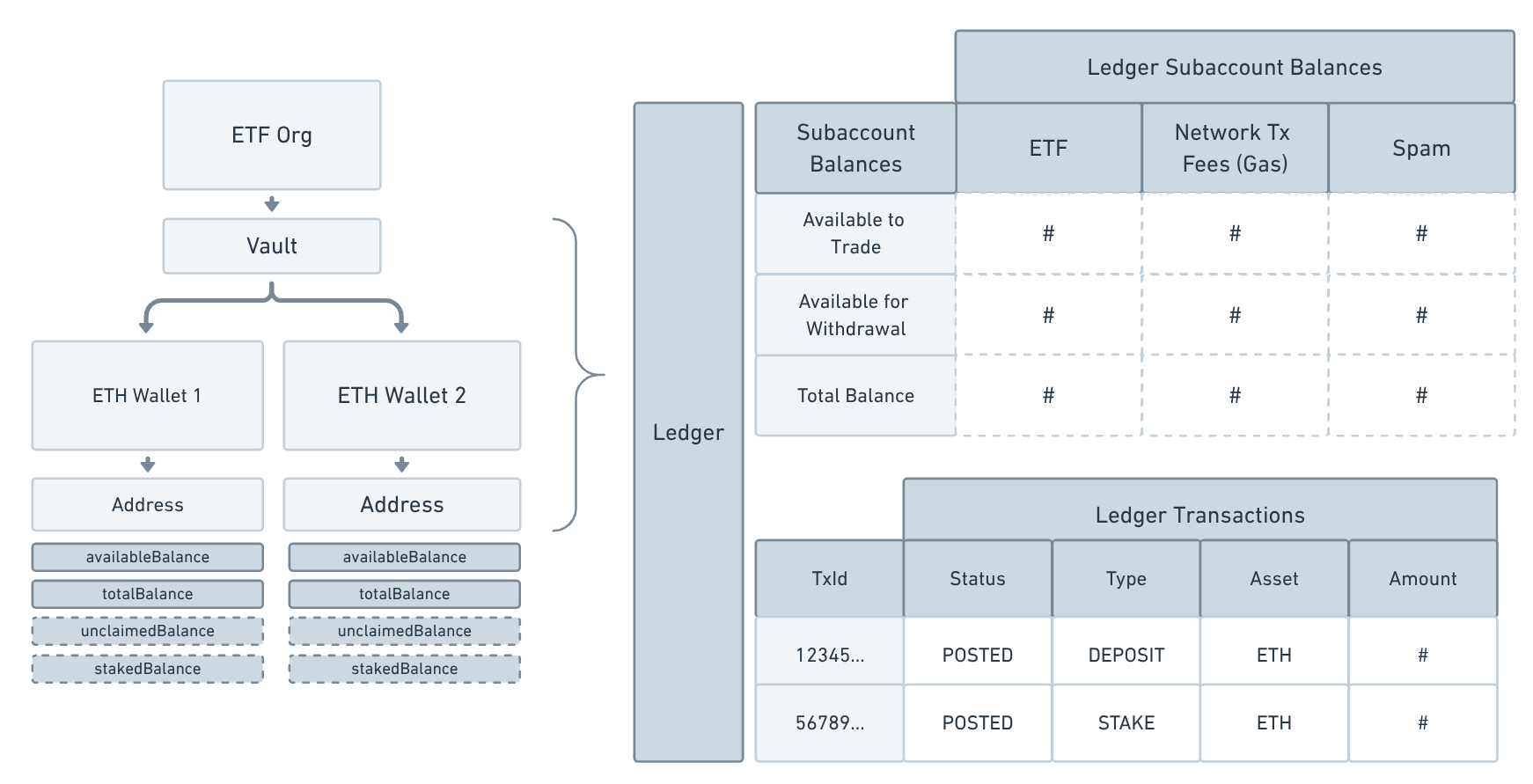
An ETF will also leverage a virtual ledger, which sits across all of the on-chain wallets to more easily track cross-wallet balances for the ETF fund, network fees and spam (dust deposits). The ledger removes the need to track fund balances across multiple wallets or track network fees v. client funds within a single wallet balance.
The ETF fund will still be able to access the organization through the iOS application and client web dashboard, but will now see a new "balances" section calling out specific balances on the virtual ledger and the three subaccounts needed to manage and track funds effectively:
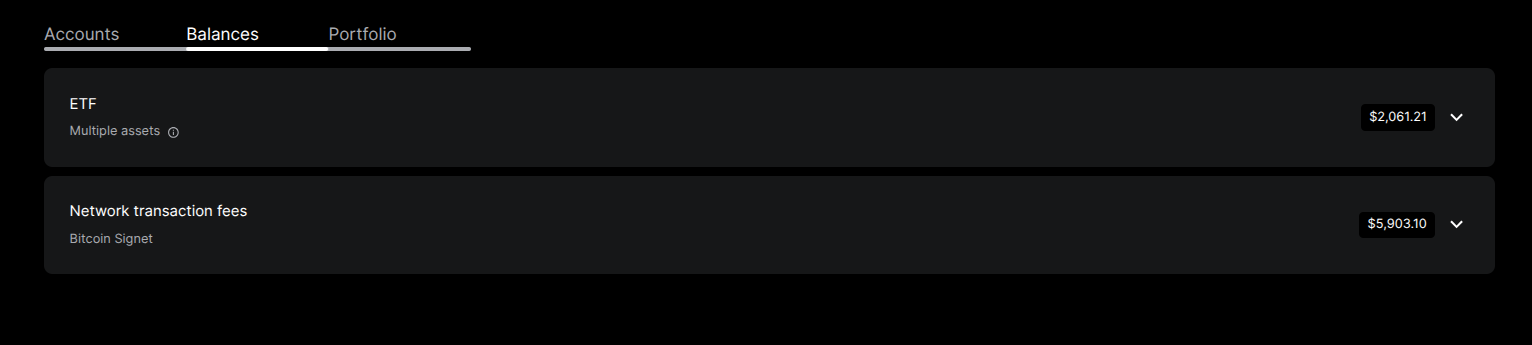
Subaccounts
ETF for Org- Primary balance of ETF fund used for NAV and external reporting
Network transaction fees for Org- Balance of funds deposited by Anchorage for the purposes of facilitating on-chain movements of underlying assets for withdrawals or staking.
Spam Deposits- Balance of funds flagged as spam from unknown deposits, held in a segregated balance. This balance should not be used for any future business activity and will be swept out of the wallet by Anchorage on a regular cadence.
Balances
"assetType": "ETH",
          "availableForTrading": "68",
          "availableForWithdrawal": "68",
"totalBalance": "100"availableForTrading: Not applicable for this use casetotalBalance: Total balance in the wallet, regardless of any pending operations or balance available to stake oor withdrawavailableForWithdrawal: Amount available to stake or withdrawal from the account
This does not mean all funds are available in the same source wallet, so any withdrawal or stake operation must also check the source wallet prior to initiating the operation.
Ledger transactions and wallet transactions
There are two types of transactions types you will need to reconcile when interacting with this product.
- Wallet transactions: Transactions like normal deposits, withdrawals, etc. are all visible and available via our GET /transactions API.
- Ledger transactions: Additional transactions are available in the ledger that map to standard wallet transactions as well as other ledger-specific operations.
API staking from ledger
Staking for the ETF product requires working with both the wallet balances and the virtual ledger.
Ethereum pre-pectra
To start, please review the ETF staking guide.
Staking steps
- Identify ETF fund balance: To identify how much ETH can be staked, first look at the Subaccount
ETFand find the balanceavailableForWithdrawal. This is total balance that can be staked. - Confirm how many validators to stake: Next, confirm how much you would like to stake.
- For pre-Pectra upgrade staking (post-Pectra support coming soon), identify how many validators you would like to spin up - 32 ETH per validator.
- Select wallets: Then, dentify which wallets you would like to leverage to initiate the staking operations. If they have less than 32 ETH, you many need to move funds around your wallets.
You may need to make an internal transfer of ETH between wallets to ensure you have sufficient balances within the specific source wallet.
- Initiate Staking Operations: Reference the ETF Staking Guide mentioned above.
Ethereum - Pectra upgrade support
- Coming soon!
Solana
- Coming soon!
FAQs
What is the difference between the status DELEGATION_REWARD and STAKING_REWARD ?
DELEGATION_REWARD and STAKING_REWARD ?DELEGATION_REWARD: is used for consensus layer rewards (the ones that are accrued in the beacon chain and are periodically swept into the execution layer by the protocol).STAKING_REWARD: is used for execution layer rewards ("miner" / block proposer)- "
DIEM_PREBURN" : is a movement of assets on the Diem blockchain to a state of preburn. This will not longer be used as this Blockchain is no longer active.
Note: "RESTAKING_REWARD", "DELEGATION_REWARD" and "DIEM_PREBURN" would not apply to a standard Ethereum staking flow. Only STAKING_REWARD would apply here.
When staking multiple validators, can I send more than 32 ETH (pre-pectra) and Anchorage will spin up multiple?
- Yes, this is supported. If you send 64 ETH, we will spin up 2 (gas fees ignored for simplicity).
Testing in sandbox
- To test in sandbox , please use ETHHOODI or other supported Anchorage Digital testnets.
- Please note, the staking queue for testnet can be quite high at times, so please research this ahead of time for that specific testnet.
Updated about 1 year ago