
5. Withdraw from subaccounts
Learn how to withdraw assets
Part of the lifecycle of managing end client assets is enabling withdrawals from their subaccounts to external wallets. The withdrawal process differs by asset type.
Withdraw USD
A few considerations before you initiate a USD withdrawal request:
- External wire fees will be paid for by Anchorage Digital at this time (subject to change).
- Funds may only be transferred to the same account from which it was initially deposited. If an end client wants to send funds to another account, the account must be in their name.
- The USD is then transferred out after confirmation by the wealth manager and end client via wire.
USD withdrawal process
- Wealth manager initiates a USD withdrawal via API.
- Anchorage will send a Docusign to the end client and copy the wealth manager.
- Following that, the end client will review and approve.
- Once the Docusign is signed and returned to Anchorage Digital, the process kicks off, and the wire is initiated and sent to the end client's account.
- Withdrawal transaction completed in the ledger.
Additional considerations
Banks that use master and subaccount structure (typically investment accounts):
- JPM
- Morgan Stanley
- TD Bank
- Vanguard
- Merrill Lynch
Format to send data via API:
bankAccountNr: "##-##-#####"bankRoutingNr: "#####"memo: "FCC [Client Name], FCC [recipient bank brokerage sub-account number########]"
API withdrawal request
curl --request POST \
     --url https://api.anchorage-staging.com/v2/subaccounts/subaccountId/fiat/withdrawals \
     --header 'accept: application/json' \
     --header 'content-type: application/json' \
     --data '
{
  "asset": {
    "amount": "1000.00",
    "assetType": "USD"
  },
  "customerDetails": {
    "beneficiary": {
      "accountNumber": "1234567890",
      "address": {
        "address": "123 Main St",
        "address2": "Apt 4B",
        "city": "Anytown",
        "country": "USA",
        "state": "CA",
        "zipcode": "90210"
      },
      "name": "Jane Doe"
    },
    "financialInstitution": {
      "address": {
        "address": "123 Main St",
        "address2": "Apt 4B",
        "city": "Anytown",
        "country": "USA",
        "state": "CA",
        "zipcode": "90210"
      },
      "code": "ABA",
      "id": "routing_id_123",
      "name": "Bank of America"
    },
    "intermediateFinancialInstitution": {
      "address": {
        "address": "123 Main St",
        "address2": "Apt 4B",
        "city": "Anytown",
        "country": "USA",
        "state": "CA",
        "zipcode": "90210"
      },
      "code": "ABA",
      "id": "123",
      "name": "Bank of America"
    },
    "memo": "For services rendered"
  }
},
Pro TipPrior to submitting the withdrawal request, please ensure the subaccount has sufficient funds and will continue to have sufficient funds while the request is being processed.
If funds fall below the required available balance to complete the withdrawal, Anchorage Digital will have to reach out to the Wealth Manager to correct the situation prior to completing the request.
In-kind digital asset withdrawals
New programmatic in-kind withdrawalsAnchorage has released support for in-kind withdrawals via API. Three key changes to note:
- New create trusted destinations API.
- New Docusign approval needed from the end client prior to creating the trusted destination.
- Updated withdrawal API payload for withdrawals to trusted destinations.
- API permission & key updates required to support in-kind withdrawals.
Step 1: Configure your API key permission group
Ensure you have added the following 2 permissions to your API Key.
- Withdrawal = Yes
- Manage Trusted Destinations = Yes
Once you quorum approve this operation, the key will be ready to use!
Step 2: Add your trusted destinations
Prior to sending assets off platform, you will need to submit the whitelisted "trusted destination" requests requests for each of your end client's external withdrawal addresses.
To start, leverage the new [Create a new trusted destination API].
For wealth management integrations, the trusted destinations will also be tied to an owner which represents a wealth management client (customerId).
Post-submission - Client Docusign (per trusted destination)
For each destination, a Docusign will be sent to the client to review and sign, to ensure these confirmed by the end client.
Once signed, the Anchorage Digital ops team will review and approve these. If there are any issues, Anchorage Digital will reach out to clarify any necessary details.
curl --request POST \
     --url https://api.anchorage-staging.com/v2/trusted_destinations \
     --header 'accept: application/json' \
     --header 'content-type: application/json' \
     --data '
{
  "idempotentId": "YOUR_GENERATED_UUID_HERE",
  "trustedDestinations": [
    {
      "assetType": "ETH",
      "address": "0x430EF7FAB8e10dFb8B7c50c2026d0e247FEE4B8",
      "name": "Test Ethereum Address 3",
      "trustedDestinationAmlQuestionnaire": {
        "destinationType": "SELFHOSTED_WALLET",
        "selfhostedDescription": "Personal ETH wallet for testing",
        "selfhostedWalletOwner": "PERSON_OR_ENTITY",
        "recipientType": "PERSON",
        "recipientFirstName": "John",
        "recipientLastName": "Doe",
        "recipientFullName": "John Doe",
        "recipientCountry": "US",
        "recipientStreetAddress": "123 Main St",
        "recipientCity": "San Francisco",
        "recipientStateProvince": "CA",
        "recipientPostalCode": "94105"
      },
      "description": "Test Ethereum wallet for demo purposes",
      "memo": "ETH demo wallet 3",
      "isNetworkLevel": false
    },
  ],
  "owner":
  {
    "type": "CUSTOMER",
    "id": "7266559476aac38fc8c7c2022f93a9d1b9b618b1c9e2b4387840b595dcd374aa" //customerId
  }
}
Step 3: Initiate withdrawal to a trusted destination
Once the API Key and trusted destinations are all configured and approved, leverage the Initiate withdrawal endpoint to withdraw the assets.
As soon as Anchorage Digital receives the request, the Anchorage Digital account admins will need to verify the operation on their iOS devices. Once approved by the admins and quorum us complete, the operation will move to the Anchorage risk review phase and then broadcast on-chain.
Pro TipAdmins can batch approve operations on their iOS device (see batched endorsement ).
Note: If multiple withdrawals are queued up for the same asset at the same time, they might be queued up to be processed rather than all processing in parallel. Also, flagged withdrawals might delay same-asset withdrawals. Expect small delays in these cases.
{
  "source": {
    "id":"15bb8b12-d991-45d2-b784-c83c4449265b",
    "type":"SUBACCOUNT"
  },
  "assetType": "ETH",
  "destination": {
    "id": "0xf0Ed16EeedD8111B40De252467eE9d0E14cbfe99",
    "type": "ADDRESS"
  },
  "amount": "1",
  "description": "",
  "withdrawalAmlQuestionnaire": {
    "useTrustedDestinationAml": true,
    "purpose": "INTRA_COMPANY",
  }
}
Purpose options: Have the client choose whatever option best matches the purpose of their withdrawal.
TRADING_SETTLEMENTLENDINGINVESTMENTEXPENSESFEE_PAYMENTGRANT_PAYMENTPRIZE_AWARDGIFTREIMBURSEMENTREBALANCEINTRA_COMPANY
(Deprecated) Digital asset withdrawals - Email request
Manual only (API coming soon)Digital asset withdrawal requests will need to be made manually for now while the API is under development.
Initiate withdrawal process
- Wealth manager emails Anchorage Digital ([email protected]) notifying that a end client is requesting an asset withdrawal using the digital asset withdrawal instructions form (see below for details included on form).
- Anchorage Digital will send the asset withdrawal template via Docusign to the wealth manager to fill out on the end client's behalf.
- Then, the end client will get a Docusign email for them to review and approve.
- Once the Docusign is signed and returned to Anchorage Digital, the internal process kicks off to complete as specified in the Docusign.
- Test payment: Initiated by Anchorage Digital ops to ensure the end client receives the funds in the correct address.
- Wealth manager email confirmation: Once they receive it, the wealth manager will need to confirm with our ops team that the end client has received it.
- Actual payment: Then, Anchorage Digital ops will initiate and send the remaining amount from the initial request to the destination wallet.
- Withdrawal transaction completed.
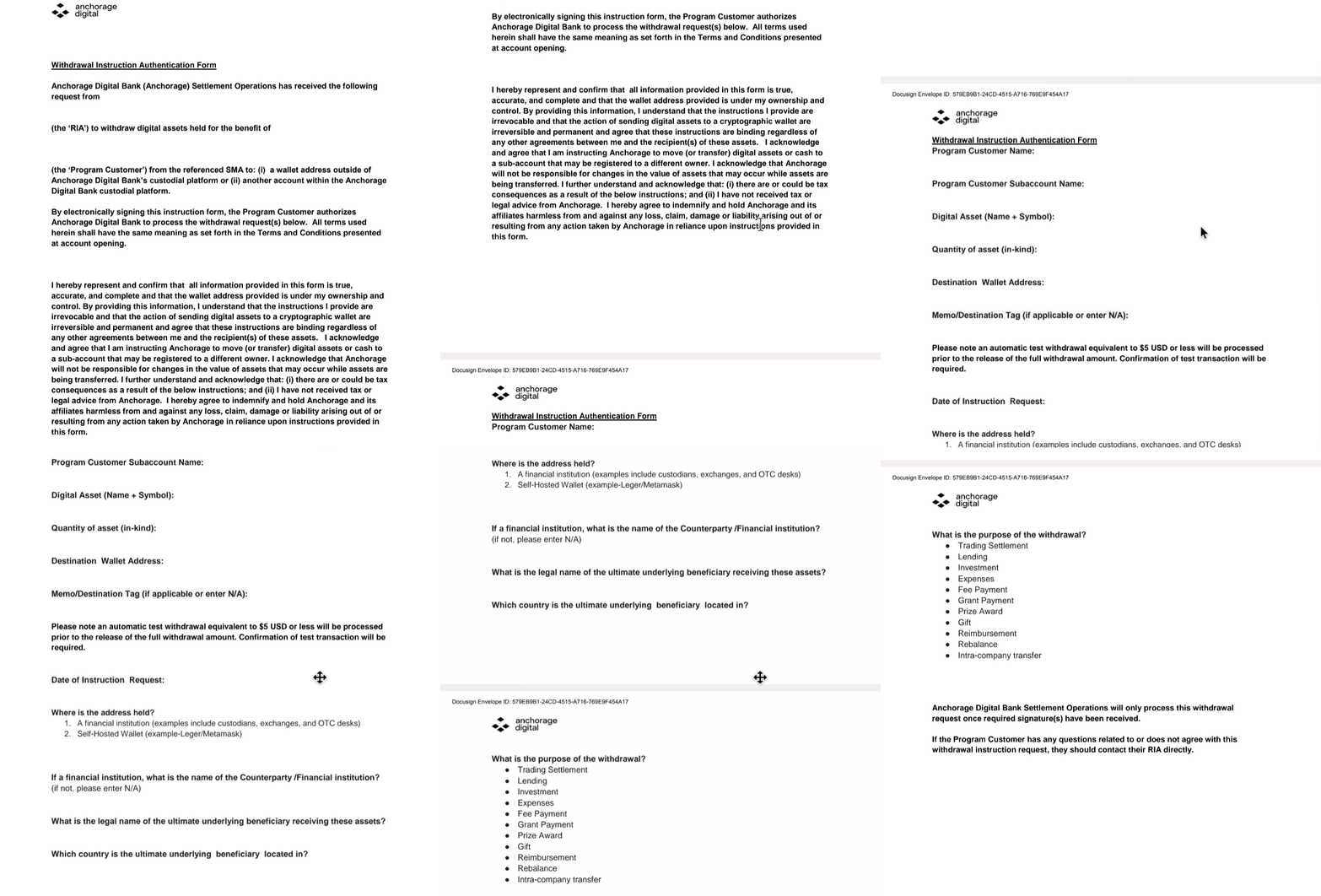
Digital asset withdrawal instruction authentication form
- Date
- Program customer name:
- Program customer subaccount name:
- Program customer subaccount ID:
- Digital asset (name + symbol):
- Quantity of asset (in-kind):
- Destination wallet address:
- Where is the address held?:
- A financial institution (examples include custodians, exchanges, and OTC desks).
- If a financial institution, what is the name of the counterparty /financial institution? (if not, skip this section).
- Self-hosted wallet (example-leger/metamask)
- A financial institution (examples include custodians, exchanges, and OTC desks).
- What is the legal name of the ultimate underlying beneficiary receiving these assets?
- Which country is the ultimate underlying beneficiary located in?
- What is the purpose of the withdrawal? (Select one)
- Trading settlement
- Lending
- Investment
- Expenses
- Fee payment
- Grant payment
- Prize award
- Gift
- Reimbursement
- Rebalance
- Intra-company transfer
Example form
Updated 5 months ago