
Overview
How the Wealth Management Integration Works
This guide covers key product overviews, terminology and integration basics to help get you started with the integration, including:
- Important terminology to understand before starting your integration.
- The high-level account structure.
- The end-client lifecycle.
- Core concepts for the wealth management integration.
- Primary APIs needed to complete the integration.
Understanding these core concepts will help you move beyond the documentation and start your integration.
Terminology and architecture
The wealth management integration can be complex to understand unless you take time to understand the high-level terminology and architecture at the start. There are several key terms to take note of that will be critical as you begin your integration.
| Term | Meaning |
|---|---|
| Wealth manager (wealth manager firm) | Parent wealth management firm onboarding and contracting as a client of Anchorage Digital. |
| End client (program customer) | The wealth manager's end client or program customer, either an individual or legal entity who will have a unique customerId. |
| End client account (subaccount) | A unique account within the wealth manager's account, tied to one or more end client beneficial owners. Each end client can have one or many client accounts (subaccounts). |
| Organization | At Anchorage Digital, the organization is the highest hierarchical classification within the product, where the wealth manager is onboarded. Each wealth manager will have only 1 organization. |
| Vault | Under each organization and associated legal account, there will be 1 vault. A vault is Anchorage Digital’s way of organizing asset wallets and API key permissions. Each vault has its own security and quorum approval policy, where the admins are able to elect who manages each vault and how many vault members constitute a quorum for sensitive transactions or activities made within the vault. Vaults can hold single or multiple assets, depending on the use case. Each vault also has its own |
| Wallet | Anchorage Digital wallets are tied to a particular blockchain and serve as a flexible way to aggregate and manage addresses. This removes the complexity and need for users to manage multiple addresses, while maintaining the ability to trace assets and view separate on-chain interactions. There may also be multiple wallets on the same blockchain within the same vault, if needed to support the use case. Wallet creation: This is supported via API for this integration by tying each wallet to a specific end client account (subaccountId), which will act as the deposit wallet for the end client account. Note: If a vault is ever deleted, clients need to ensure that individuals with access to wallet addresses refrain from sending additional assets to the deleted vault. In the event an existing deposit is made into an address under a deleted vault, Anchorage Digital would be able to reactivate it to retrieve the assets. |
| Address | The underlying on-chain address associated to the wallet. Funds are moved into and out of on-chain addresses throughout the life cycle of the wealth manager's relationship with Anchorage Digital. For this integration, these are not meant to reconcile 1-1 with the end client account balances, as those are tracked on the ledger across many wallets and addresses. |
| API permission group | Permissions enabled for any API keys provisioned tied to this permission set. |
| Shared API key | An API key created by the wealth manager that is shared with Anchorage Digital for the purposes of automated settlement of assets within the Anchorage Digital ecosystem. |
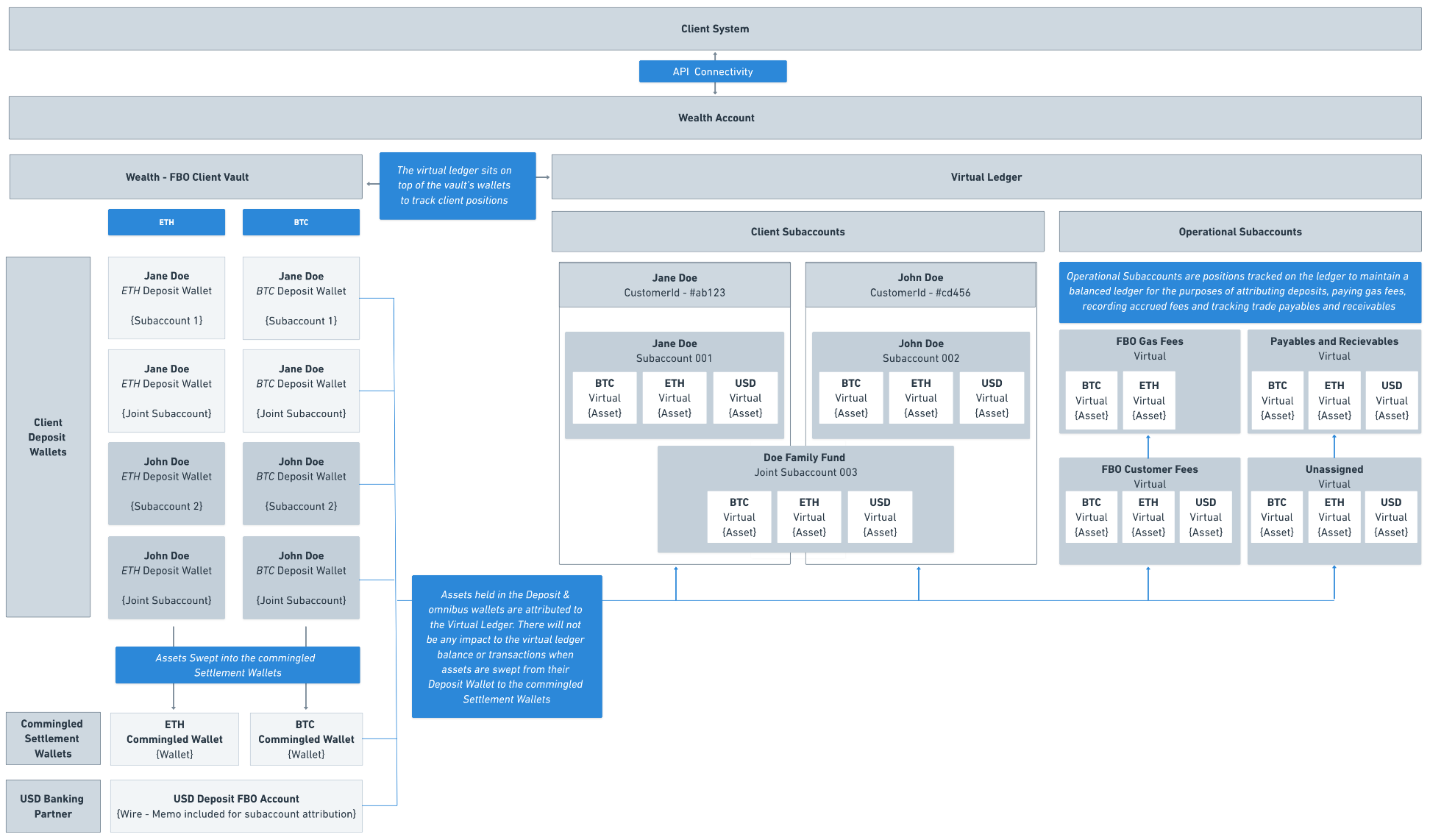
Integration overview
Client lifecycle
Once a wealth manager is onboarded to Anchorage Digital Bank (ADB), they will be able to begin onboarding their clients via API. The end-client journey begins with onboarding and loosely follows the steps outlined below:
1. Onboard the end-client: The wealth manager collects necessary onboarding details from the end-client and submits to Anchorage Digital via API for review and approval.
2. Create and configure a subaccount: Once the onboarding application is approved, the wealth manager will be able to create the first subaccount. The subaccount setup will enable the wealth manager to configure fees charged to the account or they can leave them blank and submit them manually. Fees are all paid in USD and will be remitted back to the wealth manager after being processed through Anchorage Digital the following month.
3. Fund and manage a subaccount: The wealth manager will create a deposit wallet(s) for any assets the end client would like to deposit in-kind. These wallet deposit addresses are unique to the end client subaccount and should not be reused for other subaccounts later on. For USD, wire memos need to be tied to the specific end client subaccount. Once digital assets hit the deposit wallet, the wealth manager will need to share attribution information to Anchorage Digital via API.
4. Trade and rebalance a subaccount: The wealth manager instructs trades via Anchorage Digital Bank affiliate, Anchorage Hold, using the Orders API in a single order or using block trading across multiple subaccounts.
5. Withdrawal from a subaccount: The wealth manager instructs crypto asset and USD withdrawals, subject to end-client authentication.
6. Tax data for a subaccount: Anchorage Digital has partnered with a third-party vendor, TaxBit, to make tax data available to the wealth manager and their end clients. This data is available via API integration as well as tax forms for the program customer.
7. Statements & reporting for a subaccount: The wealth manager receives trade confirmations and can view statements sent directly to their end clients in adherence with custody rule requirements.
Core concepts
The ledger
The ledger, used for the wealth manager integration, is designed with scale and capital efficiency in mind. Each wealth manager onboarded to Anchorage Digital has their own instance of the ledger, which tracks crypto and USD positions and sits across their end-client's on-chain wallets and USD wallet balances.
The ledger is comprised of multiple subaccounts. These are the individual accounts that track multiple underlying asset positions and transactions.
The ledger has two types of subaccounts:
1. End client (program customer) subaccounts: Accounting of end-client positions and transactions.
2. Anchorage Digital operational subaccounts::Accounting for unassigned deposits, trades, settlement and withdrawals to ensure the ledger is balanced at all times. These are funds still owned by the end client but are automatically managed by the platform to ensure all balances tie out and reconcile at the end of each day.
- Network transaction fees for org: Funds deposited by Anchorage Digital for the purposes of covering all on-chain fees for settlement transfers. These funds will not impact the ledger balances of the program customers but will be seen when looking at wallets on-chain.
- BO customer fees for org: Funds accrued for the purposes of paying subaccount and custody fees. This subaccount will only be impacted during the billing cycle.
- Payables and receivables for org: Funds held for the purposes of settling trades with dealers.
- Unassigned funds for org: Funds that have not yet been assigned to a subaccount (e.g. in-kind deposits with missing attribution information).
Each end client may have one or many subaccounts assigned to their customerId.
These subaccounts have asset position balances and transaction types, which correspond to the on-chain and off-chain activity tied to the funds involved. Funds within these subaccounts can be rebalanced within the end client's (program customer's) subaccounts, assuming they're settled.
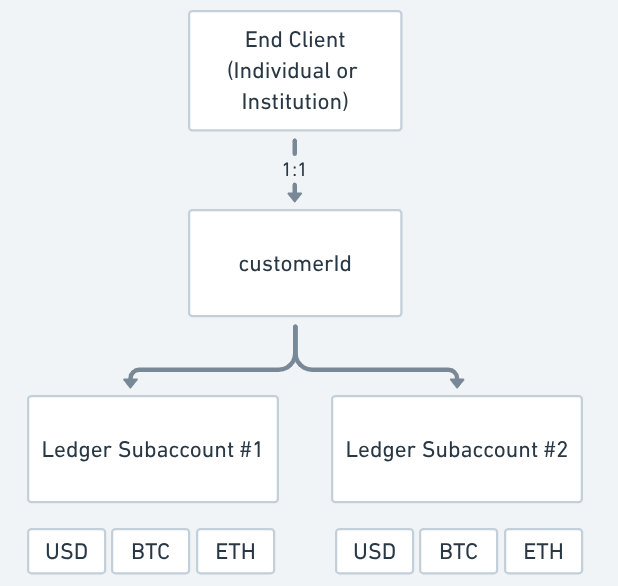
End client subaccount structure
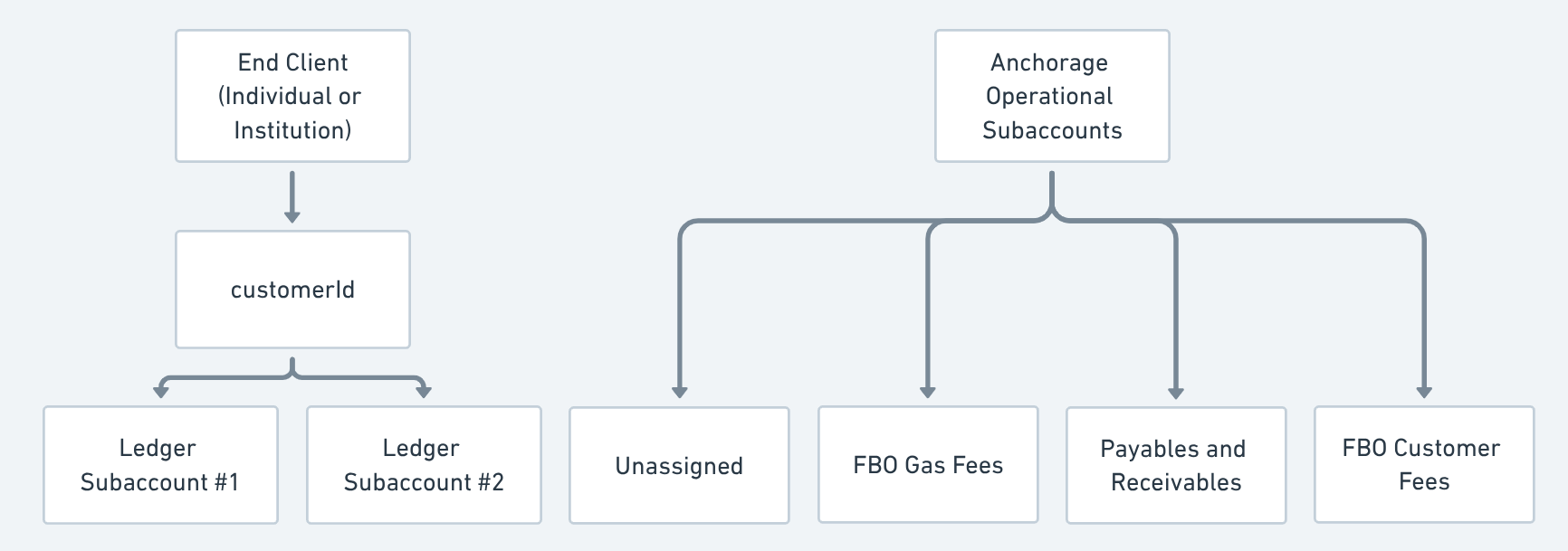
End client subaccount structure
Balances
These subaccounts have asset position balances, transaction amounts and transaction types, which correspond to the on-chain and off-chain activity tied to the funds involved. Funds within these subaccounts can be rebalanced within subaccounts only for the same end client, assuming they're settled.
availableForTrading: Balance you can trade with—may include funds that have not settled.availableForWithdrawal: Balance of settled funds available to withdraw, less any unsettled trades.totalBalance: Balance after each settlement is completed and does not reflect unsettled trades.
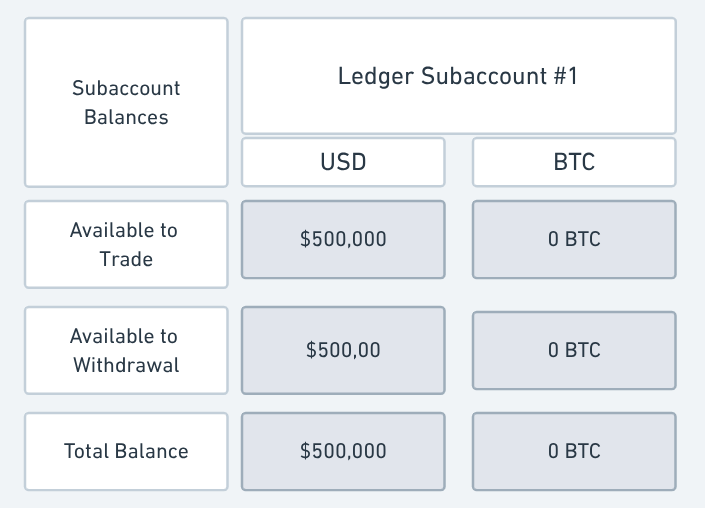
Subaccount Balances
Subaccount billing
It is important to consider and design your end-to-end account fee and billing strategy before you start onboarding clients.
Review the following categories of billing and review the billing section in the following pages prior to getting too far in subaccount testing.
| Billing method | Overview |
|---|---|
| Automated billing (configured at subaccount-level) | Billing fees configured at the time of subaccount setup. |
| Manual billing (submitted via API for all subaccounts once a month) | Needs to be submitted by the wealth manager via manual billing API end-point and needs to be processed before Anchorage Digital finance pays out the following month. |
| Billing structure | Overview |
|---|---|
| Bundled | Bundled fee model refers to the wealth manager charging a single “management fee” showing up as a single-line item on the PC monthly statement. Anchorage Digital's custody fee is deducted from this overall fee charged to the advisor. |
| Unbundled ("fully disclosed") | Unbundled (aka “fully disclosed”) fee means every fee type that the wealth manager chooses to charge their clients (i.e. PCs) are disclosed on the PC statement e.g. PC will see a custody fee and management fee all show up as separate line-items on their monthly statements. |
Most wealth managers leverage anAutomated billing method with an unbundled ("fully disclosed") billing structure.
Block trading
Anchorage Digital's block trading capability enables wealth manager to rebalance asset holdings across end clients and client accounts for a single asset with one single order to ensure same execution price for all underlying trades.
Each order will contain many allocations tied to the recipient subaccounts. This is an incredibly powerful tool that can be used to re-balance all client portfolios as the same time or trade out of small positions (rolling them all into 1 order) to ensure they meet trade precision minimums.
All trades on the platform are considered "pre-funded" and do not require the wealth manager or TAMP to initiate any settlement transfers to fund or settle trades, as this is all done automatically by Anchorage Digital on the ledger.
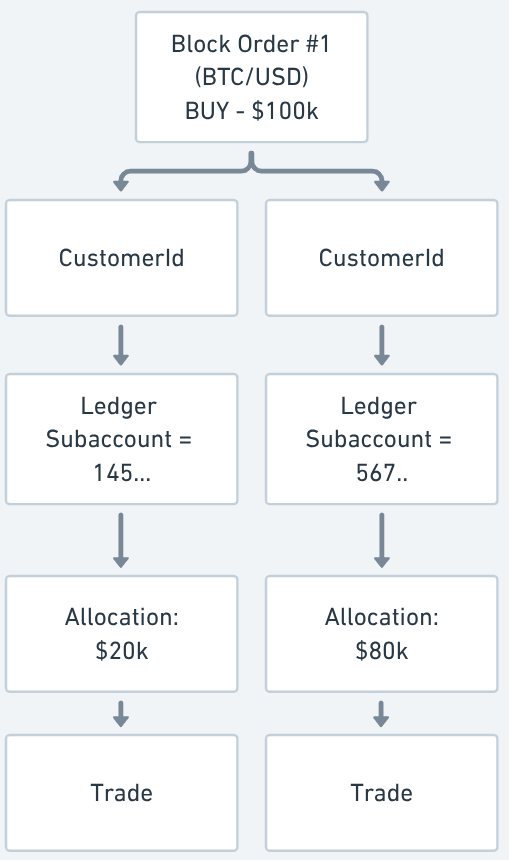
Block trade structure
Trading on unsettled assets
In order to prevent any rebalancing while prior trades are settling with dealers, program customer funds can be traded even if they are unsettled. So if you buy BTC and want to sell it for ETH same day, you can trade even if the BTC is unsettled. These impact the three balances within each of the subaccounts.
Subaccount balances
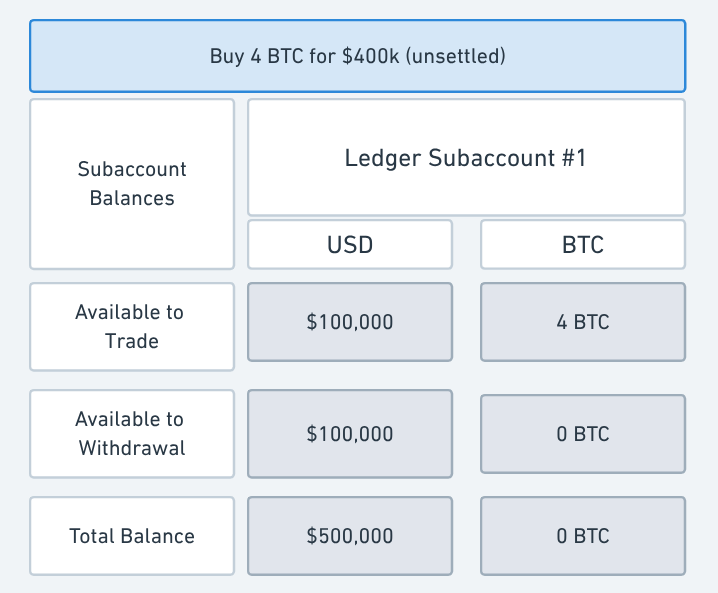
Subaccount balances - $400k BTC Buy (unsettled)
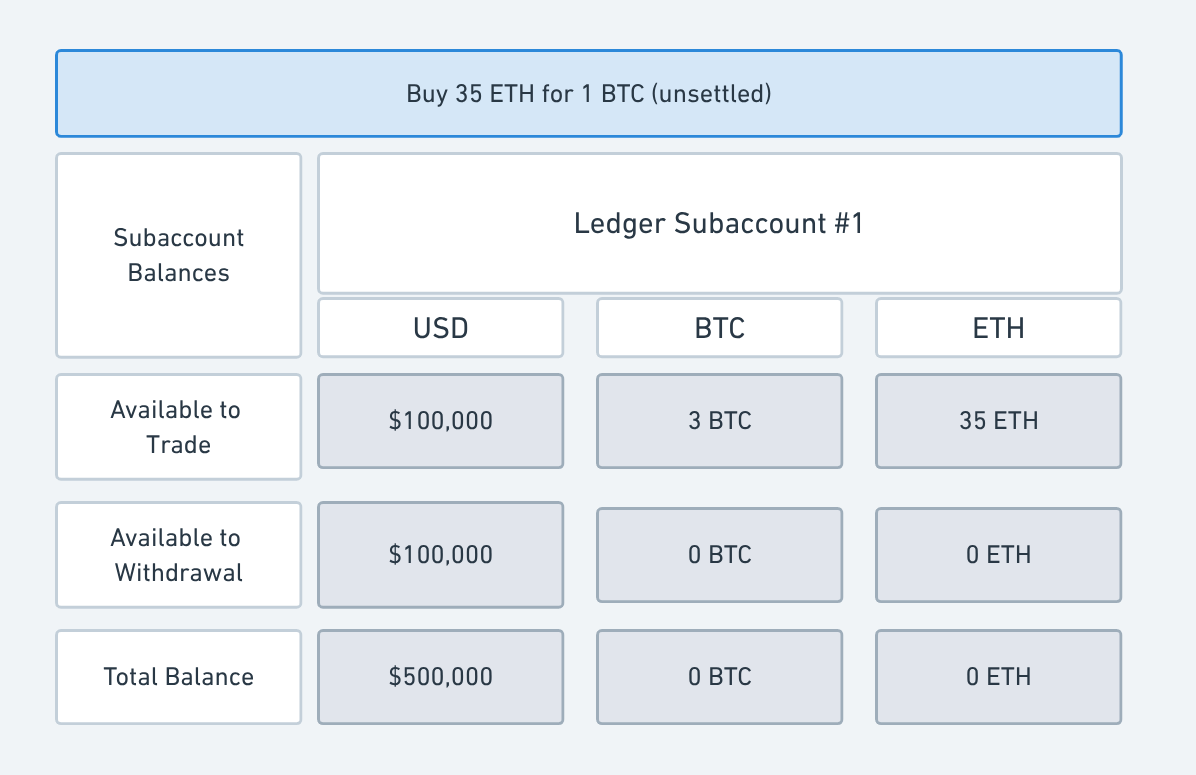
Subaccount balances - 1 BTC swap for 35 ETH (unsettled)
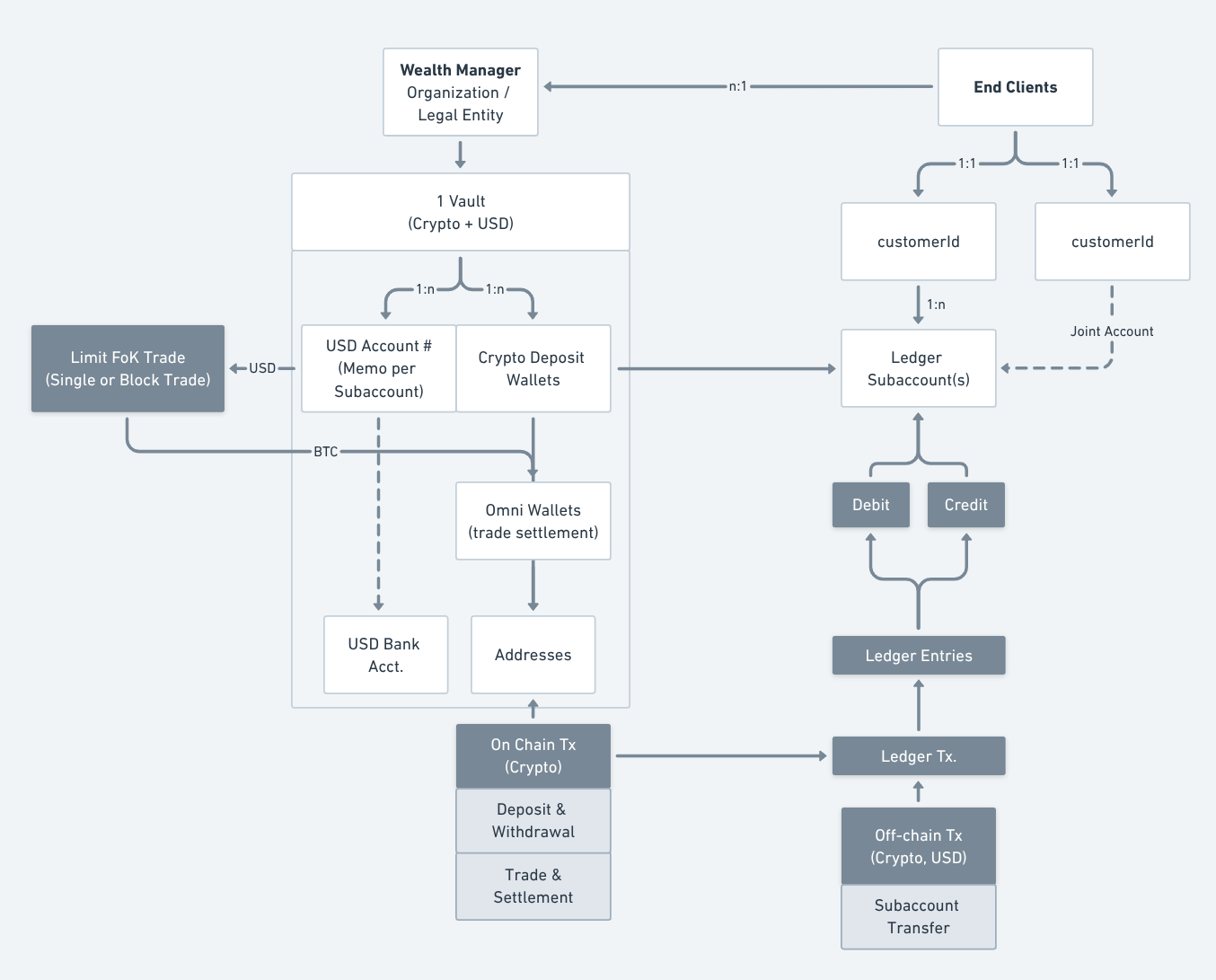
Example flow of funds
API keys
API keys are critical for building the integration and for managing the business. The two API keys are generated by the wealth manager at the time of onboarding:
- Client API key: This key enables fully programmatic access to the wealth manager's ledger instance for the purposes of onboarding, trading, and managing the end client accounts.
- Shared API key (with Anchorage Digital): This key enables Anchorage Digital to move funds on-chain between internal wallets for the purposes of trade settlement. This key is generated and approved by the wealth manager but is only accessible by the Anchorage Digital team to move funds internally or initiate withdrawals, which require quorum approval from the wealth manger to process.
APIs to review
While reviewing our master API documentation, you will only need to interact with the following categories of APIs. Others are used for different use cases and should not be used (e.g. /Transactions [on-chain] are different from /Subaccount/transactions [ledger])
- Onboarding
- Wallets
- Deposit attribution
- Subaccounts
- Trading (Orders)
- Tax
- Webhooks
API changelog
Subscribe and keep tabs on the changelog, as we're constantly working to improve the developer experience.
Updated about 1 year ago