
4. Trade and rebalance subaccounts
Trade and rebalance subaccounts
Prior to trading funds for the end client, there are a few things to consider:
- Asset support
- Trade precision & minimums
- Balance available to trade
- Trade types and methods (REST or websocket)
- Single order and block trades
- Pricing data
- Submitting an order
- Trading best practices
- Settlement life-cycle
- Integration steps
Note: Testing in sandbox will differ from production.
Asset support
Asset support for this product is a subset of the total assets supported for custody at Anchorage Digital. In general, you can fetch the supported assets by selecting our Get supported trading pair endpoint. Aside from FLOW, these are all supported. Also, see the introduction section for an updated list if you are still getting access to an API Key.
Note: This list will differ slightly in sandbox from production.
Trade precision and minimums
Anchorage Digital is now communicating trade minimum_order_size in the list upportedt trading pairs endpoint. These will be enforced at the time of order submission.
{
  "data": [
    {
      "description": "Buy AAVE with USD, or Sell AAVE for USD",
      "pair": "AAVE-USD",
      "referenceData": {
        "baseAssetType": "AAVE",
        "baseSizeIncrement": "0.00000001",
        "lastUpdateTime": "2024-07-09T15:57:55.249Z",
        "minimumOrderSize": "0.000000010000000000000002",
        "priceIncrement": "0.0000001",
        "quoteAssetType": "USD",
        "quoteSizeIncrement": "0.01"
      }
},base_size_increment: Minimum size increment when specifying order quantity in base asset. If this is eight decimals, this means that the order needs to be made with a maximum of eight decimal places (i.e. AAVE designated precision out to 0.00000001).quote_size_increment: Minimum size increment when specifying order quantity in quote asset. If this is two decimal places, the wealth manager can request in USD with a maximum of two decimal places (i.e. USD designated precision out to 0.01)price_increment: Minimum price increment when specifying order price. If this is eight, the price response the client gets back from the liquidity provider may be up to eight decimal places (i.e. 0.00000001).minimumOrderSize: Minimum required size for base asset to successfully place an order.
Balance available to trade
For each subaccount, you will need to get the availableForTrading balance. This represents the subaccount's trading balance by asset. This is the balance that the subaccount can trade at any given time and is updated post-execution. This will reflect unsettled asset balances as well, which are also available to trade.
"balances": [
        {
          "assetType": "BTC",
          "totalBalance": "1",
          "availableForWithdrawal": "0.5",
          "availableForTrading": "0.5"
        }
      ]
availableForTrading = 0.5 BTC

Subaccount balance impacts from trade and settlement activity
Trade types and method
We currently support the following order types for the wealth management integration:
- Limit FoK
- (More order types coming soon!)
These orders need to be submitted using the following methods:
Single orders and block trades
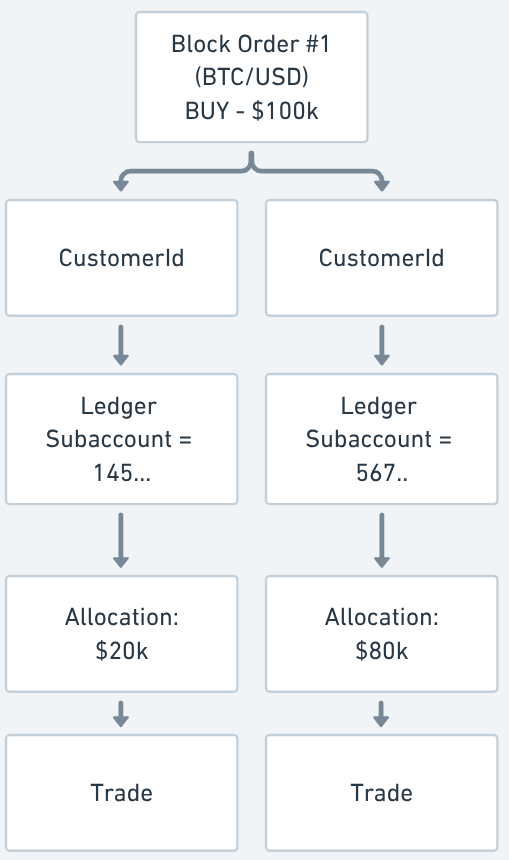
When submitting an order, you can submit either single subaccount orders or block trades, where you are able to make multiple subaccount-level allocations on the ledger for a single order.
Trades are routed to our liquidity providers via smart order routing.
Single orders
Single subaccount trade orders are supported for the wealth management integration. These are ideal for more tailored program customer portfolio management styles or direct customer trade requests. These can also be used to on/off-ramp specific assets or USD deposited and you do not need to rebalance across subaccounts.
Block trading
This is an industry-first offering of digital asset block trading for wealth managers. Combining Anchorage Digital’s industry-first solution for crypto block trading with integration partner tools marks a critical step forward in fair pricing and efficient execution for digital asset wealth managers.
Block trading lets wealth managers execute multiple trades across their entire book of clients as a single institutional order. This service maximizes efficiency, minimizes cost, and offers equitable execution for all clients.
Additional considerations:
- All allocations need to add to the total order quantity.
- All allocations must meet the subaccount's
availableToTradebalance, otherwise the order will fail. - All subaccounts will get their own trade detail with specific resulting quantities, all corresponding to the parent order.
Pricing data
Asset price data can be pulled from Anchorage Digital’s market data stream via API Websocket.
You will need to:
- Configure your Websocket connect.
- Subscribe to the asset pair.
- Then, leverage the response data when submitting the order (see below).
Code example for subscribing to market data:
def subscribe_marketdata(ws, symbol, receiver):
    msg = json.dumps({
        "messageType": "MarketDataSnapshotRequest",
        "timestamp": datetime.now().isoformat(),
        "payload": {
            "type": "subscribe",
            "symbol": symbol,
            "reqId": str(uuid.uuid4())
        }
    })
    ws.send(msg)
    while True:
        resp = json.loads(ws.recv())
receiver(resp){
"messageType": "MarketDataSnapshotRequest",
"timestamp": "2023-02-08T14:19:43.901696",
"payload": {
"type": "subscribe",
"symbol": "BTC-USD",
"reqId": "e07b9683-af27-481a-b4db-1c492114e930"
}
}{
"messageType": "MarketDataSnapshot",
"timestamp": "2023-02-08T14:19:44Z",
"version": "1.0",
"seqNum": 9,
"sessionId": "fcd5d616-8208-401a-9001-d299bcc9a8c6",
"payload": {
"asks": [
{ "price": "23083.25076763", "size": "1" },
{ "price": "23084.28705625", "size": "4" },
{ "price": "23084.78", "size": "5" },
{ "price": "23089.14", "size": "40" },
{ "price": "23094.57", "size": "50" }
],
"bids": [
{ "price": "23081.96", "size": "1" },
{ "price": "23080.96918517", "size": "4" },
{ "price": "23080.61566563", "size": "5" },
{ "price": "23074.06841953", "size": "40" },
{ "price": "23068.87", "size": "50" }
],
"reqId": "e07b9683-af27-481a-b4db-1c492114e930",
"symbol": "BTC-USD"
}
}Submit an order
Now that you are ready to trade, you can submit a block order over websocket or REST API.
A few considerations to note:
- Include a minimal 1-5% buffer on price to ensure it crosses the market price.This will not apply this price but rather reduce trade rejections during price volatility. Execution will still take place at best market rate.
orderType=Limit
- Ensure you submit in USD for buys and in-kind for sells.
accountIdnot needed for subaccount trades.- For block trades, please note that:
- Allocations are currently capped at 1,000 per order.
- Currently limited to Limit FoK order type.
- Allocation needs to be specified in the same currency as in the order quantity.
- If an allocation has insufficient funds, the entire order will fail.
- All trade orders, including Block Orders, are currently limited to fill-or-kill orders.
- We do not support programmatic order cancellations or short selling.
BaseSizeIncrement:- When submitting a block order, the allocation quantities need to be rounded upon entry according to
BaseSizeIncrement. - E.g. 0.0001 for BTC-USD.
- We only take into account the parent order precision when routing to liquidity providers.
- For example:
- 0.00051 BTC would not route to all liquidity providers:
- 0.0005 BTC will be sent to liquidity providers, as 0.00001 BTC has higher precision than the
BaseSizeIncrement.
- 0.0005 BTC will be sent to liquidity providers, as 0.00001 BTC has higher precision than the
- On the other hand, 0.0005 BTC would successfully route to liquidity providers:
- 0.00049 BTC and 0.00001 have higher precision than
BaseSizeIncrement
- 0.00049 BTC and 0.00001 have higher precision than
- For trades with a total of 0.00052 BTC:
- You may leverage the allocation for subaccounts to achieve smaller precision, as long as the parent order quantity matches the
BaseSizeIncrement.
- You may leverage the allocation for subaccounts to achieve smaller precision, as long as the parent order quantity matches the
- 0.00051 BTC would not route to all liquidity providers:
- When submitting a block order, the allocation quantities need to be rounded upon entry according to
| Order status | Details |
|---|---|
FILLED | The entire order was successfully filled and the trade or set of trades was executed. |
CANCELED | This is only for limit fill or kill (FoK) orders that did not cross the book. You can submit these again. |
REJECTED | A REJECTED order status could be a number of things:
|
| Trade status | Details |
|---|---|
PENDING | When a client requests to accept a quote, the trade will be marked and returned as PENDING upon success.
|
EXECUTED | When the filled price and fees become available, the trade will be updated to be EXECUTED before a settlement is created. |
SETTLING | Once the client has sent their netted owed balances to Anchorage Digital the trade will move to SETTLING. |
SETTLED | After Anchorage Digital has sent its netted owed balances to the client the trade will move to SETTLED. |
REJECTED | This trade has failed, likely due to asset volatility outside of designed slippage or an insufficient trading limit. The trade will move to REJECTED. |
CANCELED | The trade was canceled manually and will move to CANCELED. |
Block order over REST API
curl --request POST \
     --url https://api.anchorage-staging.com/v2/trading/order \
     --header 'Api-Access-Key: [Insert API Key]' \
     --header 'accept: application/json' \
     --header 'content-type: application/json' \
     --data '
{
  "clOrderId": "6fb5fc79-0bb4-446d-82dd-d4687fb56a02",
  "symbol": "BTC-USD",
  "side": "BUY",
  "currency": "USD",
  "quantity": "100.00",
  "orderType": "LIMIT",
  "limitPrice": "100004.05",
  "timestamp": "2025-02-20T18:32:51.133Z",
  "allocation": [
    {
      "subaccountId": "ec761b5e-fd2c-497a-a9a0-f8738ac97bd",
      "quantity": "10"
    }
    {
      "subaccountId": "bc1234e-12v3-ab31-1234-gf8738ac597bd",
      "quantity": "90"
    }
  ]
}
,{
"data": {
"clOrderId": "6fb5fc79-0bb4-446d-82dd-d4687fb56a02",
"orderId": "a94c8d75-6c9d-4903-95f3-5b0893e76cb7",
"execId": "3fb532c79-0bb4-446d-82dd-d4687fb56a02",
"accountId": "0e2b2f9d-8d10-4f1e-960b-28567255045f",
"symbol": "BTC-USD",
"side": "BUY",
"currency": "USD",
"counterCurrency": "BTC",
"orderType": "MARKET",
"orderStatus": "FILLED",
"avgPx": "21005.4",
"avgPxAllIn": "21006.00",
"orderQty": "10000.00",
"cumQty": "10000.00",
"counterQty": "0.4760680586896702",
"fee": "0.00001359805",
"feeCurrency": "BTC",
"counterQtyAllIn": "0.4760544606302961",
"transactTime": "2022-11-20T20:32:16.423Z"
}
}Block order over websocket
{
  "messageType": "NewOrderSingle",
  "timestamp": "2023-03-12T22:22:09.925952Z",
  "payload": {
    "clOrderId": "47ce2580-5e57-45d8-b67f-71a5aa55d05f",
    "symbol": "BTC-USD",
    "side": "SELL",
    "currency": "USD",
    "quantity": "10000",
    "orderType": "LIMIT",
    "limitPrice": "21000",
    "timeInForce": "GTC",
    "accountId": "3fa8372d-b51d-44ab-a456-43e947e4be10"
  }
}{
"messageType": "ExecutionReport",
"timestamp": "2023-03-12T22:22:09.925952Z",
"version": "1.0",
"seqNum": 3,
"payload": {
"clOrderId": "47ce2580-5e57-45d8-b67f-71a5aa55d05f",
"orderId": "99b60f12-a20c-4977-99ea-f9affdb8e5f2",
"accountId": "3fa8372d-b51d-44ab-a456-43e947e4be10",
"symbol": "BTC-USD",
"orderQty": "1000",
"side": "SELL",
"currency": "USD",
"orderType": "LIMIT",
"limitPrice": "21000",
"timeInForce": "GTC",
"orderStatus": "FILLED",
"execId": "58fd5afc-b85e-45d1-951e-d6429ea9cd54",
"execType": "FILL",
"avgPx": "21990.01",
"avgPxAllIn": "21968.02",
"cumQty": "10000",
"fillPx": "21990.01",
"fillQty": "10000",
"leavesQty": "0",
"cancelQty": "0",
"fee": "0.00045521",
"feeCurrency": "BTC",
"submitTime": "2023-03-12T22:22:09.909251Z",
"transactTime": "2023-03-12T22:22:09.925050Z"
}
}Example reject response:
{
  "messageType": "ExecutionReport",
  "timestamp": "2023-03-12T22:22:09.925952Z",
  "version": "1.0",
  "seqNum": 5,
  "payload": {
    "clOrderId": "47ce2580-5e57-45d8-b67f-71a5aa55d05f",
    "orderId": "99b60f12-a20c-4977-99ea-f9affdb8e5f2",
    "accountId": "3fa8372d-b51d-44ab-a456-43e947e4be10",
    "symbol": "BTC-USD",
    "orderQty": "1000",
    "side": "SELL",
    "currency": "USD",
    "orderType": "LIMIT",
    "limitPrice": "21000",
    "timeInForce": "GTC",
    "orderStatus": "REJECTED",
    "execId": "6a33f72c-ec2e-4c7a-b443-29de3f884145",
    "execType": "REJECT",
    "avgPx": "0",
    "avgPxAllIn": "0",
    "cumQty": "0",
    "fillPx": "0",
    "fillQty": "0",
    "leavesQty": "0",
    "cancelQty": "0",
    "rejectReason": "Invalid request",
    "rejectReasonText": "invalid price: 21500.0001, must be multiplication of 0.01",
    "fee": "0",
    "feeCurrency": "",
    "submitTime": "2023-03-12T22:22:09.909251Z",
    "transactTime": "2023-03-12T22:22:09.925050Z"
  }
}
Trading best practices
The recommended best practice trade flow includes:
- Confirm supported trade pairs and log asset precision requirements for the asset.
- Configure pricing market data feed.
- Fetch the client's
availableToTradebalance prior to each trade. - Hit the "Request for Quote (RFQ)" endpoint for that trade to ensure the desired quote is being priced (precision and trade min verification). This will require a
tradingAccountId. - If yes, submit a single or block order over websocket (or REST API).
- Once filled, monitor the orders and trade endpoints to report on execution price and quantity to end clients.
- Monitor subaccount balances as the trade settles to ensure sufficient balances available to trade and withdrawal, if needed.
Pro-tipWhen submitting an order using the REST orders endpoint, orders can get rejected or cancelled for a myriad of reasons. Implementing retry logic can help with this.
Suggested logic overview:
- Retry submitting orders after the 1st, 2nd and then one last one after 4 seconds. This retry will be beneficial in cases where you receive a non Successful (e.g. non 201 error code).
- In instances where your trade is rejected but you're receiving a 201 response, that's likely due to a liquidity provider related issue (e.g. insufficient liquidity or min. order size not hit etc.) and a retry won't help.
- A 500 (Internal Server Error) error code, can be due to a number of reasons but typically indicates a balance issue for the subaccount(s) tied to the respective order.
Settlement life-cycle
Settlement of trades on the wealth manager integration is completely automated and managed by Anchorage Digital. There are a number of steps and considerations to note when learning about the trade settlement process:
- Trading on unsettled balances
- Network fees
- Settlement types, statues, timing and lifecycle
Trading on unsettled balances
Unsettled balances are available for trading immediately, but are not available for withdrawals until funds have been settled. Timing may vary depending on settlement frequency.
Network fees
Anchorage Digital funds network fees needed to cover trading and settlement activities. Network fees are held in a virtual ledger account in the wealth manager's omnibus wallet for the benefit of program customers.
Sweeps from your deposit wallet to the omnibus wallet and transfers from the omnibus wallet to Anchorage Digital’s settlement vault require on-chain gas fees for settlement, which are automatically deducted from the FBO gas fees subaccount.
Since Anchorage Digital is the only one moving funds for settlement, we will allocate and track gas fees paid out of an omnibus subaccount titled “FBO gas fees.” This subaccount will be funded regularly by Anchorage Digital.
Settlement types, statues and life-cycle
Anchorage Digital automates trade settlement for wealth managers via a shared API key, enabling seamless asset movement from the wealth manager and end client's wallets to our liquidity providers for settlement. Settlement typically occurs at the end of the day but can occur on a rolling basis to accommodate liquidity provider timelines.
This process involves transferring assets from the program customer deposit and FBO omnibus settlement wallets on-chain to Anchorage Digital's settlement vault for settlement with liquidity providers. Fiat settlements follow the same process.
Settlement tickets, each covering one or more trades, are generated based on liquidity provider activity and settlement periods. Billing fees are settled monthly.
Settlement status
| Status | Details |
|---|---|
PENDING | The settlement is created. Each settlement could refer to one or multiple trades. |
SETTLING | Settlement of funds from the wallets under the wealth manager's account has completed and Anchorage Digital is now settling with the liquidity providers on the back end. |
SETTLED | All funds are settled back to the wallets and subaccount balances are now updated. |
CANCELED | Settlement is canceled for various reasons. |
| Other statuses that appear in our API Docs that do not apply to the wealth management use case —please ignore. |
Settlement types
| Settlement types |
|---|
TRADE |
FEE (custody, advisory, model, management) |
Automated settlement status update examples
- Trade executed -> trade status =
EXECUTED - Trade added to a settlement -> trade status =
EXECUTED, settlement status =PENDING - First leg gets settled -> trade status =
SETTLING, settlement status =SETTLING - Second leg gets settled -> trade status =
SETTLED, settlement status =SETTLED
| Trade status | Details |
|---|---|
PENDING | When a client requests to accept a quote, the trade will be marked and returned as PENDING upon success.
|
EXECUTED | When the filled price and fees become available, the trade will be updated to be EXECUTED before a settlement is created. |
SETTLING | Once the client has sent their netted owed balances to Anchorage Digital the trade will move to SETTLING. |
SETTLED | After Anchorage Digital has sent its netted owed balances to the client the trade will move to SETTLED. |
REJECTED | This trade has failed, likely due to asset volatility outside of designed slippage or an insufficient trading limit. The trade will move to REJECTED. |
CANCELED | The trade was canceled manually and will move to CANCELED. |
Integration steps
import requests
import uuid
import urllib
import logging

request_headers = {
    "accept": "application/json",
    "content-type": "application/json",
    "Api-Access-Key": "[Insert API Key]"
}

customer_id='[Insert CustomerId]'

request_path = f"https://api.anchorage-staging.com/v2/subaccounts/customers/{customerId}/accounts"
try:
	response = requests.get(path=request_path,
                          headers=request_headers)
  if response.status_code == 200:
    data = response.json()['data']
    #check out the buying power from 'availableForTrading'
except requests.exceptions.HTTPErroe as err:
  logging.error(err)


order_request = {
  "clOrderId": "fb45ac11-584a-4c31-93ae-6db3c0fb1547",
  "symbol": "ETH-USD",
  "side": "SELL",
  "currency": "ETH",
  "quantity": "0.226",
  "orderType": "LIMIT",
  "limitPrice": "2100",
  "accountId": "",
  "subaccountId": "",
  "timestamp": "2024-01-26T19:31:55Z",
  "allocation": [
    {
      "subaccountId": "e3523a44-0a16-4923-8c65-5bd3c0fe5513",
      "quantity": "0.128"
    },
    {
      "subaccountId": "82962476-6250-443e-bcda-1bf6f959ebcd",
      "quantity": "0.098"
    }
  ]
}

request_path = f"https://api.anchorage-staging.com/v2/trading/order"

try:
	response = requests.post(path=request_path,
                           json=order_request
                           headers=request_headers)
  if response.status_code == 201:
    data = response.json()['data']
    #check out the buying power from 'availableForTrading'
except requests.exceptions.HTTPErroe as err:
  logging.error(err)


order_id='1a69504c1-18ae-9fb4-a4ea-9f83699'

request_path = f"https://api.anchorage-staging.com/v2/trading/orders/{order_id}"
try:
	response = requests.get(path=request_path,
                          headers=request_headers)
  if response.status_code == 200:
    data = response.json()['data']
    #check out the order status, avgPx and fee...
except requests.exceptions.HTTPErroe as err:
  logging.error(err)
Settlement testing flow (sandbox)
Sandbox testing of settlement is more difficult due to mismatch of tradeable asses vs. testnets assets.
Updated about 1 year ago