
Trusted destinations
Overview
Trusted destinations are allowlisted destination addresses or USD Banking Institution recipient accounts outside of Anchorage digital. These require a quorum approval to be confirmed.
There are multiple options for creating a trusted destination:
Asset type
| Web dashboard | API | |
|---|---|---|
| Digital assets | Supported | Supported |
| USD | Supported | Not supported |
Single or batch
| Web dashboard | API | |
|---|---|---|
| Single address | Supported | Supported |
| Batch upload | Supported | Not supported |
Network-level
Allow this destination to be receive any asset in the network (only applicable for digital asset trusted destinations)
- For API, this is indicated with the boolean:
isNetworkLevel
| Web dashboard | API | |
|---|---|---|
| Digital assets | Supported | Supported |
| USD | Supported | Supported |
Read more about trusted destinations in our user guide.
Adding a trusted destination via API
Example
{
  "idempotentId": "{Add IdempotentId Here}",
  "trustedDestinations": [
    {
      "address": "{Add Address Here}",
      "assetType": "{Add Asset Here}",
      "description": "{Add description here}",
      "isNetworkLevel": {true or false},
      "memo": "{Add memo here}",
      "name": "{Add name of Trusted Destination here}",
      "trustedDestinationAmlQuestionnaire": {
        "destinationType": "FINANCIAL_INSTITUTION",
        "institutionCountry": "US",
        "institutionName": "{Add Institution Here}",
        "recipientCity": "New York",
        "recipientCountry": "US",
        "recipientFirstName": "Satoshi",
        "recipientFullName": "Satoshi Nakamoto",
        "recipientLastName": "Nakamoto",
        "recipientPostalCode": "11211",
        "recipientStateProvince": "New York",
        "recipientStreetAddress": "1234 Street, New York, NY",
        "recipientType": "DESTINATION_INSTITUTION"
      }
    }
  ]
}
Additional API details
| API support | API | Web |
|---|---|---|
| View trusted destinations | Supported | Supported |
| Create trusted destination | Supported | Supported |
| Delete trusted destination | Supported | Supported |
| Edit trusted destination | Not supported | Supported |
| Download CSV of trusted destinations | Not supported | Not supported |
Filling out the trustedDestinationAmlQuestionnaire
trustedDestinationAmlQuestionnaireThis is a required step for Anchorage Digital Bank clients adding Trusted Destinations via API.
destinationType: The type of custodial provider (“financial institution” or “self-hosted wallet”) at which the trusted destination is held. For example, a crypto exchange would be considered a “financial institution,” and a hardware wallet or browser wallet would be considered a “self-hosted wallet.”
destinationDescription: The name of the custodial provider—e.g. the name of a crypto exchange. destinationCountry: The country where the custodial provider is incorporated as a two letter country code (see full list of country codes here). This is only required for the “financial institution” destination type.
recipientType:_ The ultimate beneficiary of the assets at the trusted destination. For example, if you are sending assets to your organization’s address at a crypto exchange, then the recipient type should be “my organization.”
- If you are sending assets to a third party’s address at a crypto exchange, then the recipient type should be “other entity” or “other person” depending on whether they are a legal entity or an individual.
recipientName: The name of the ultimate beneficiary of assets at the trusted destination. This is only required for the “other entity” or “other person” recipient types.
recipientCountry: The country where the beneficiary entity is incorporated or where the beneficiary person resides as a two letter country code (see full list of country codes in this page. This is only required for the “other entity” or “other person” recipient types.
Configuring a Trusted Destination to an API key
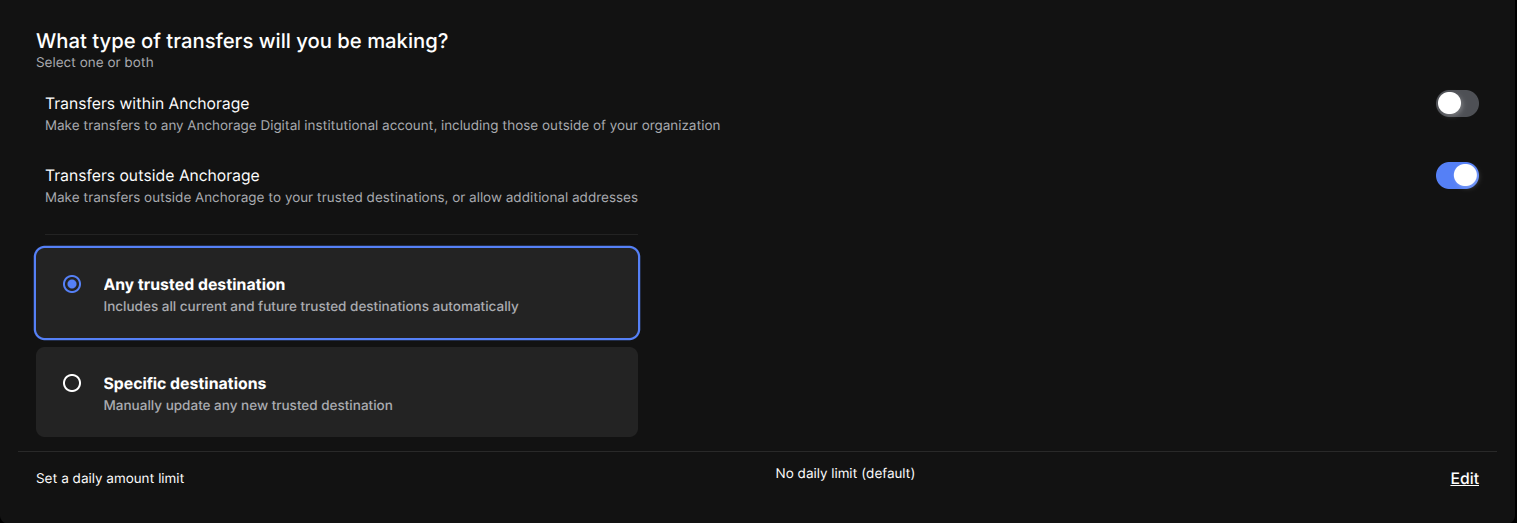
Default: "Specific destinations"
If you are using the Transfers API to transfer to a Trusted Destination, by default, there is an additional step required. Once the Trusted Destination has been added, you must follow the Transfers API Guide to permission a new or existing API group with the ability to send funds to that Trusted Destination.
Alternative: "Any trusted destination"
You can also select "Transfer to Any Trusted Destination" when configuring your key to automatically allowlist all past and future Trusted Destinations to that key.
Updated 4 months ago